
Plans and Limits
Every project runs on one of three plans. The Skapi dashboard shows the Trial plan as Free; this documentation uses the name Trial, which is what the API and the plan card call it. The limits below are per project.
| Trial | Standard | Premium | |
|---|---|---|---|
| Price | Free | $19 per month | $89 per month |
| User accounts | 50 | 50,000 | 100,000 |
| Database storage | 500 MB | 3 GB | 10 GB |
| File storage, pooled | 1 GB | 120 GB | 600 GB |
| Email storage | 50 MB | 1 GB | 5 GB |
| E-mail sends per month | 50 | 5,000 | 50,000 |
| Newsletter subscribers | 50 | 5,000 | 50,000 |
| Bandwidth per month | 10 GB | 100 GB | 400 GB |
| Queued ticket runs per month | 100 | 10,000 | 100,000 |
| Ticket log retention | 30 days | 90 days | Kept |
| Past a limit | Stop | Stop | Billed as overage |
One Trial limit is counted per owner rather than per project: across every Trial project one owner has, 200 newsletter mails per calendar month, on top of each project's own 50. Standard and Premium are always counted per project and have no owner cap.
E-mail sends are the mails a project chooses to send: every recipient of a newsletter, and every invitation e-mail sent or resent to a user. Automated mail, such as the signup confirmation, is not counted. See Sending Newsletters and Inviting Users.
File storage is one pooled figure covering your web hosting, your record file attachments and your AI indexed files.
Queued ticket runs are the runs of a ticket that go on after a Respond action answered the caller: at once, after a delay or at a time. A call that waited its turn in the line of a ticket with a Concurrency setting is one too. See Queued ticket runs.
A Trial project never expires and needs no card.
Your plan and usage
The Plan & Usage card on your project's Settings page at skapi.com shows the plan the project is on and how much of each metered limit it uses: user accounts, database storage, the pooled file storage split into hosting, cloud storage and file storage, this month's bandwidth, e-mail sends and queued ticket runs, and email storage. The note under a meter says how that limit is counted. The Upgrade Plan button opens the plan page of the project, and the line under it says what happens past a limit on the current plan.
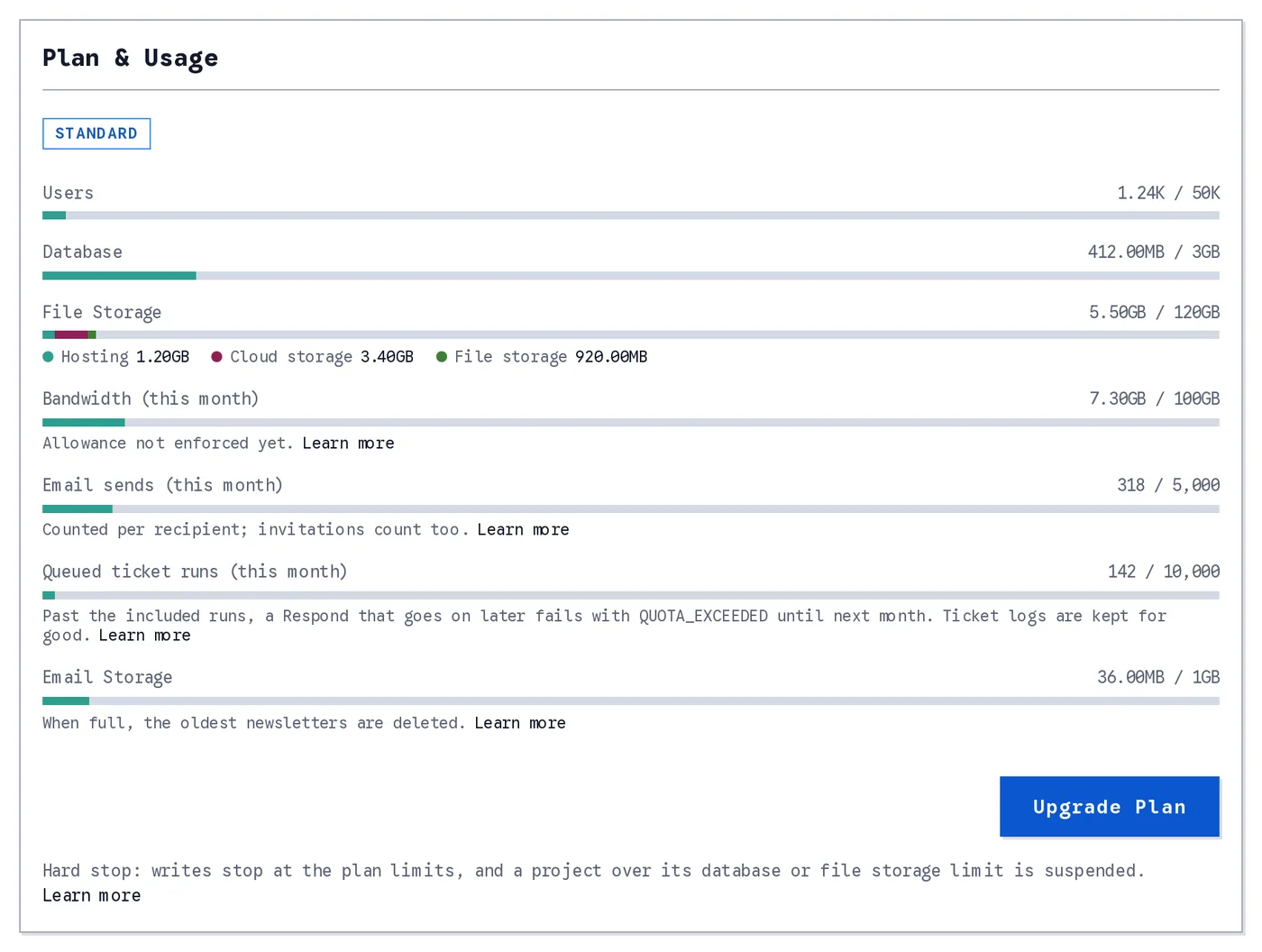
The Plan & Usage card of a Standard project. Every metered limit has a meter here; the plan page lists the rest.
Trial and Standard: hard stop
The Trial and Standard plans stop at their limits instead of billing you for the excess. A request that needs more than the plan allows is refused, and everything else keeps working.
- New signups past the user limit are refused with
INVALID_REQUEST: User limit exceeded. - Record writes past the database storage limit are refused with
EXCEED_LIMIT: Project has exceeded database storage limit. Consider upgrading your plan. - File uploads past the file storage limit are refused with
EXCEED_LIMIT: Project has exceeded file storage limit (hosting, files and BunnyQuery index share it). Consider upgrading your plan.This covers record files, web hosting files and the BunnyQuery index, which share one pool. - Newsletter sends past the monthly limit are refused, and so are subscriptions past the subscriber limit. One newsletter costs one send per subscriber it goes to, so one send to a full Trial list of 50 subscribers uses all 50 monthly sends. A Trial project is also refused once its owner has used the 200 newsletter mails a month their Trial projects share. Invitation e-mails count as sends too, resends included, and are refused past the project's monthly limit; see Inviting Users.
- Downloads and hosted pages past the monthly bandwidth allowance are refused until the next month; see Bandwidth.
- A Respond that would queue a ticket run past the month's figure fails with
QUOTA_EXCEEDED; see Queued ticket runs. - Email storage is not refused: when it is full, the oldest newsletters are deleted to make room; see Email storage.
Reaching a plan limit
A project that reaches or goes past a plan limit is never suspended and never deleted for it. Its existing data keeps working: users can sign in, records and files can be read, and hosted pages are served (within the bandwidth allowance). Only the requests that need more than the plan allows are refused, with the errors above. A project can end up past a storage limit, for example after it moves to a smaller plan; it keeps running the same way, and writes that need more room are refused until it is back under the limit.
The project owner gets an e-mail when a limit reaches 80% of the plan (a usage warning) and again when it reaches 100% (limit reached). Each e-mail names the limit, shows the usage against it, says what happens at the limit, and links to the project's dashboard and to the upgrade page. This covers user accounts, database storage, file storage, email storage, monthly e-mail sends, newsletter subscribers, monthly bandwidth and monthly queued ticket runs, on Trial and Standard, one e-mail per limit. For email storage the e-mail says your past emails will get deleted, because full email storage deletes the oldest newsletters instead of refusing anything. A monthly limit starts over with the month.
To make room, either reduce usage or upgrade:
- Delete data you no longer need. The Skapi dashboard lists the project's records, files, hosting files and newsletters, and each can be deleted from there.
- Upgrade the plan from the Upgrade Plan button on the project's Plan & Usage card.
The project's pages at skapi.com show a red banner when a limit is reached and an amber one when a limit is at 80% or more. Each banner lists the limits with their figures, says what is refused, and links to where that data can be managed. The red banner covers database storage, file storage, user accounts, newsletter subscribers and monthly e-mail sends; the month's bandwidth and queued ticket runs get red banners of their own once used up. Email storage has no banner, since nothing is refused when it is full.
On Premium nothing is refused: usage past the plan is billed as overage, below.
Premium: overage
The Premium plan has no hard stop. Past an included limit the excess is metered and added to your next invoice, and nothing is ever refused for going over.
| Metric | Rate past the included limit |
|---|---|
| File storage | $0.05 per GB-month |
| Database storage | $0.50 per GB-month |
| Email storage | $0.10 per GB-month |
| E-mail sends | $1.00 per 1,000 |
| Newsletter subscribers | $1.00 per 1,000 subscribers-month |
| Queued ticket runs | $1.00 per 1,000 |
| Bandwidth | $0.12 per GB |
| Monthly active users | Free |
Storage overage is time weighted rather than a high water mark, so a project that sits over a limit for two days pays for two days and not for the month.
Queued ticket runs
A ticket's Respond action answers the caller at once and can let the rest of the chain go on later: right away in the background, after a delay, or at a time. Every run that goes on is a queued run, counted for the UTC month it was queued in. So is a call that waited its turn in the line of a ticket with a Concurrency setting: it is answered with a receipt at once and runs when a slot frees, the same shape of run. Trial includes 100 a month, Standard 10,000 and Premium 100,000; Premium is billed $1.00 per 1,000 past that.
When the month's figure is reached, the project's pages at skapi.com show a banner saying so (on Premium, that the rest is billed as overage). On Trial and Standard a Respond that would queue a run past the month's figure fails with QUOTA_EXCEEDED at that action, and a call that would join a ticket's line past it is refused with the same code instead of waiting: the ticket's other actions, and every Respond that stops, keep working, and the count resets with the month. The Plan & Usage card of the project shows the month's queued runs against the plan, and the Tickets page says so when they are used up. See Going on later.
The log rows a ticket writes (its consumptions and their action rows) count toward the project's database storage, shown as their own part of the Database figure on Plan & Usage. They are kept 30 days on Trial, 90 days on Standard and for good on Premium, then expire on their own; deleting a ticket deletes its logs, and the owner can clear a ticket's log before a time at any moment.
Bandwidth
Every plan includes a monthly bandwidth allowance, counted from CDN and storage access logs and reset at the start of each UTC month. Your project's current figure is on its plan card in the dashboard.
A Trial or Standard project past its allowance gets EXCEED_LIMIT: Service has exceeded monthly bandwidth limit. on downloads and hosted pages until the next month starts. Premium is never refused: bandwidth past its allowance is billed at $0.12 per GB.
Email storage
Newsletters you send are stored, and they count against the plan's email storage limit.
On the Trial and Standard plans, exceeding email storage deletes the oldest newsletters to reclaim space. Trial includes 50 MB and Standard 1 GB. On the Premium plan nothing is ever deleted and the excess is billed.
See Sending Newsletters for the send and subscriber limits.
Newsletter complaints
On every plan, a project stops sending newsletters when, in the current UTC month, it reaches 5 spam complaints, or a complaint rate of 0.5 percent once at least 100 mails have gone out, whichever comes first.
Newsletter sending stops, and so do invitation e-mails. The project keeps working, its automated e-mails keep going out, and nothing about it is suspended or deleted. An upgrade does not lift the block and it does not clear itself when the month rolls over: Skapi staff clear it after looking at the project, so contact us if yours is blocked.
Whenever a newsletter is refused, for this, for the per-owner Trial cap or for the project's own monthly sends, the sender gets a reply from the project's newsletter endpoint address saying which limit was reached.
Cancelling and failed payments
Cancelling a paid plan keeps that plan until the end of the billing period. The project then moves to the Trial plan. It is never suspended or deleted for this, even if it holds more than Trial allows: it keeps running, and writes that need more room are refused until data is reduced or the plan is upgraded again. The cancel dialog in the dashboard tells you beforehand which Trial limits it would be over.
If a payment fails, the paid plan stays in place while the payment provider retries the charge. Only when every payment retry has failed does the project move to the Trial plan, with the same rule: it is not suspended, and writes past a Trial limit are refused.
Large record data
Record data larger than 32 KB is stored as a file in your project's file storage instead of in the database, and it counts toward file storage rather than database storage.
The SDK puts it back together for you, so record.data still comes back whole.