
Errors and Logs
A consumption either succeeds, and answers { tkid, hash } (or what a Respond action composed), or fails at one of three stages: ticket (the service and the ticket itself), condition, or action. Every failure is answered with the same flat JSON body, and most failures are written to the ticket's log.
A ticket the Tickets page marks previous rules answers differently until it is saved again: see Tickets saved before this release.
The Error Body
{
  "code": "<CODE>",
  "message": "<human readable, one sentence>",
  "stage": "ticket" | "condition" | "action",
  "action": { "act": "req", "path": "actions[1].err[0]" },   // only when stage == "action"
  "detail": { ... },                                          // optional, code specific, JSON safe
  "ticket_id": "<ticket_id>"
}
A success body never has stage; an error body always does. That is how consumeTicket() tells them apart, whatever the HTTP status.
The status is 400, or 200 when the ticket's return200 is on. TICKET_BUSY is 429 (200 under return200). INTERNAL_ERROR is always 500; return200 never downgrades it.
action.path names the action that failed, counted from the ticket's actions list: actions[1].err[0] is the first action of the error chain of the second action, and actions[2].actions[0] is the first nested action of the third, a req.
Error Codes
| code | stage | when | detail |
|---|---|---|---|
INVALID_SERVICE | ticket | region prefix does not match the host, or service not found | |
SERVICE_DISABLED | ticket | the service's active is below 1, checked right after INVALID_SERVICE on every route, before the ticket is read | |
TICKET_NOT_FOUND | ticket | no ticket with that id | |
TICKET_EXPIRED | ticket | time_to_live < now | { "expired_at": <time_to_live> } |
TICKET_DISABLED | ticket | the owner switched the ticket off with the switch at the top of its detail view. Every call gets it, dry runs included, and a queued run of the ticket that comes due is skipped and logged as a failed row with skipped: disabled; the definition, count, per-user counters and log are kept. See Disabling a ticket | |
TICKET_EXHAUSTED | ticket | count <= 0 | |
USER_LIMIT_REACHED | ticket | per-user limit hit | { "limit": <limit_per_user>, "used": <consumptions by this user> } |
TICKET_BUSY | ticket | every slot of a ticket with a Concurrency setting is taken and the ticket refuses when full, or the ticket calls itself and the call is not its own next round (a self-calling ticket keeps its line to itself, whatever When full says). HTTP 429, 200 under return200. Raised after the condition passed, before any action: nothing is consumed. Logged as a failed row, unlike the other ticket-stage refusals, and never retried by a req. See One at a time: concurrency | { "concurrency": n, "running": <in flight>, "waiting": <in the line>, "self_calling": true | false } |
ISSUER_CANNOT_CONSUME | ticket | consumer is the ticket issuer | |
AUTH_REQUIRED | ticket, condition or action | a user is needed and the route is anonymous (a user or record_access condition, which a webhook can never pass, an action with no user_id, or a ${user} reference), or the token is from another project | |
METHOD_NOT_ALLOWED | condition | condition.method mismatch | { "expected": "POST", "received": "GET" } |
CONDITION_FAILED | condition, or action for a Check answer | a part of the condition did not pass, or a Check answer row did not match | { "field": "signature"|"ip"|"user_agent"|"headers"|"body"|"params"|"user"|"record_access"|"response", "keys": [ ...keys that failed ] } (keys empty for signature/ip/user_agent/record_access). See below |
PATH_NOT_FOUND | action | a reference in an action value could not be resolved | { "path": "data[payment][id]" }, the reference without ${ } |
PLACEHOLDER_MISSING | action | ${placeholder[NAME]} referenced but never captured | { "placeholder": "NAME" } |
REQUEST_FAILED | action (req) | HTTP status >= 300, refused address, connection error, per-call timeout, a header that cannot be sent, or a Secret Key that no longer exists | { "status": 502, "body": <the parsed answer, or the first 4 KB of its text when longer> }, { "reason": "timeout" | "refused_address" | "connection" }, { "reason": "invalid_header", "header": "<name>" } (see the req action), or { "reason": "secret_missing", "secretName": "<name>" } |
TIMEOUT | action | the 25 s consumption budget ran out before an action (or its HTTP call) could start; its err chain is skipped | { "elapsed_ms": n } |
ACTION_FAILED | action | the underlying Skapi operation refused (record post, access grant, group update) | { "code": "<the operation's code>", "message": "<its message>" } |
ACTION_FORBIDDEN | action | the action is not available to this project | |
QUOTA_EXCEEDED | action (resp, mail, nlsd), or ticket | a Respond would queue a run past the month's queued ticket runs, on a plan that stops there (Trial, Standard): { "field": "tkq", "limit": n, "used": n, "month": "YYYYMM" }, see Going on later; the same figure and detail, at stage ticket, for a call that would wait in a ticket's line past it. A Send e-mail or a Send newsletter past the month's e-mail sends, the Trial owner cap or the complaint shutoff: { "field": "emlsd" }, see Sending limits | |
ALREADY_RESPONDED | action (resp) | a Respond ran after the consumer was already answered | { "path": "actions[2]" } |
INTERNAL_ERROR | any | unexpected exception (reported to Skapi) |
The ticket-stage codes are the checks of step 1 of a consumption, the condition-stage codes come from Conditions and Placeholders, and the action-stage codes from Actions.
A code raised inside a req action, by its HTTP call or its Then chain, is reported with stage: "action" and, in action, the innermost action that failed: the req itself when its HTTP call failed, the nested action when its Then chain failed. A CONDITION_FAILED from a Check answer therefore carries action: { "act": "cond", "path": "actions[2].actions[0]" }, as a record post failing in the same chain carries action: { "act": "pstr", "path": "actions[2].actions[1]" }.
CONDITION_FAILED fields
detail.field names the part of the condition that failed, and detail.keys the keys of that part that did not pass: header names for headers, paths for body and params, attribute names for user. A path the request does not carry is one of those keys; it is never a separate error.
What consumeTicket() Rejects With
consumeTicket() reads the body whatever the HTTP status. A body with stage is an error, and the promise rejects with a SkapiError whose message and code come from the body and whose cause is the whole body:
try {
    await skapi.consumeTicket({ ticket_id: 'launch-coupon', method: 'GET', data: { code: 'WRONG' } });
}
catch (err) {
    console.log(err.code);          // 'CONDITION_FAILED'
    console.log(err.message);       // one sentence
    console.log(err.cause.stage);   // 'condition'
    console.log(err.cause.detail);  // { field: 'params', keys: ['code'] }
    console.log(err.cause.action);  // { act: 'req', path: 'actions[2]' } on an action failure, else undefined
    console.log(err.cause.ticket_id);
}
err.cause is a TicketError.
Errors raised before the request is sent, such as a missing ticket_id or auth: true with method: 'GET', are plain INVALID_PARAMETER errors with no cause.
return200
Webhook senders retry when an endpoint answers anything but 2xx. Most of the time a failed consumption is a request you chose not to handle, such as an event type the condition filters out, and a retry would fail the same way, so the retries only fill the log. return200: true answers 200 in those cases. The body is unchanged, so a caller that reads it still sees the error, the Log tab still shows the failure, and consumeTicket() still rejects, because it discriminates on stage and not on the status.
return200 covers every failure raised once the ticket has been read, TICKET_EXPIRED, TICKET_EXHAUSTED, USER_LIMIT_REACHED, ISSUER_CANNOT_CONSUME and TICKET_BUSY included (the last is 429 otherwise). INVALID_SERVICE, SERVICE_DISABLED, TICKET_NOT_FOUND and the AUTH_REQUIRED for a token from another project are raised before the ticket is read, so they are always 400.
INTERNAL_ERROR is the exception: it is always answered with 500, so the sender does retry, and by then the fault may be gone.
What Gets Logged
Every successful consumption is logged, and so is every dry run once the ticket has been read, whatever fails after that. Failures of a real consumption are logged when they are worth reading:
- every action-stage failure,
- every condition failure of a
consumeTicket()call withauth: true, - on an anonymous endpoint, a condition failure only when the request passed
method,signature,ip,user_agentandheadersand failed on a later part:body,params,userorrecord_access(except theX-Skapi-Ticketloop-guard refusal, which is never logged on a real consumption). Such a request came from a caller that already looks like the intended sender.
Ticket-stage failures of a real consumption (TICKET_NOT_FOUND, TICKET_EXPIRED, TICKET_EXHAUSTED and the rest) and failures of method, signature, ip, user_agent and headers on an anonymous endpoint are not logged, so a scanner hitting your endpoints does not fill the log. The one ticket-stage refusal that is logged is TICKET_BUSY: a call refused by a ticket's Concurrency setting leaves a failed row, so the limit can be seen at work.
A failed consumption does not take from the count, and does not count toward the per-user limit. The one exception is a failure a Respond in an error chain answered: the consumer got an answer, so the count is consumed and the per-user counter moves, and the row shows answered <status> (on error: <code>).
A queued run writes a row of its own when it runs, marked resumed and naming the consumption it continues, with its own action rows under it. A call that waited its turn in a ticket's line is logged the same way: the call itself as a row with a queued mark (it counts, like a consumption a Respond answered), and the run that followed as a resumed row naming it.
The Log Row
A log row's description is a JSON string of this shape:
{
  "data": <query string (raw strings) or POST body as received>,
  "query": { ... },                   // POST only, when the URL had a query string (raw strings)
  "method": "post" | "get",
  "headers": { ... },                 // as received, lowercase names; authorization and cookie replaced by "<redacted>"
  "user_agent": "...", "ip": "...", "timestamp": <ms>,
  "note": "...",                      // the consumer's `description` string, when sent
  "outcome": {
    "ok": true | false,
    "check": true,                    // dry run only
    "placeholders": { NAME: value },  // the pool at the end (values truncated to 1 KB of JSON each)
    "actions": [ { "path": "actions[0]", "act": "req", "ok": true, "result": <truncated 1 KB>, "attempts": 2, "retried": [ { code, message, ... } ] }
               | { "path": "actions[1]", "act": "pstr", "ok": false, "error": { code, message, detail } } ],
    "responded": { "status": 202, "path": "actions[1]", "at": <ms>, "body": <truncated 1 KB>, "from_error": true },  // what a Respond answered
    "queued": { "due": <ms>, "run": "<id>", "kind": "now" | "delay" | "at" },  // the run that goes on later; { "kind": "line", "run": "<id>", "position": n } on a call that waits for a concurrency slot
    "error": { code, message, stage, action?, detail? }   // when ok == false
  }
}
outcome.actions lists every action that ran, in order, with its answer or its error, so you can see how far a chain got; attempts and retried appear on an action that was tried again, and warning on a Send e-mail or Send newsletter that went out but could not be counted or marked sent. outcome.responded is what a Respond answered, and outcome.queued the queued run it left, when there is one. outcome.placeholders is the pool at the end. The whole string is capped at 60 KB: data is truncated first, then the action results.
The row of a resumed run has, beside outcome, continues (the consume id of the consumption it goes on with), queued_at, due, started, ended, waited (ms), kind and run (its attempt number); a queued run that could not be started after three tries has skipped and a failed outcome, and so does a run that came due while its ticket was switched off, with skipped: disabled. The run of a call that waited in a ticket's line has kind: "line", and self: true when the call was the ticket's own next round (a req of the ticket to its own endpoint); its outcome.responded is what a Respond in the chain would have answered, delivered to nobody.
The action rows
Beside the consumption row, every action that ran has a row of its own, keyed @<ticket_id>#<consume_id>#<path>, so a consumption's actions can be read one by one and a long chain's detail does not swell the consumption row:
{
  "from": { "ticket_id": "order-paid", "consume_id": "UwdAhf6k3Qp" },
  "path": "actions[0]", "act": "req", "ok": true,
  "started": <ms>, "ended": <ms>, "attempts": 1,
  "request": { ... },               // what the action sent, its references filled in (a Secret Key value never); for a Check answer, its rows with what each found
  "response": <the answer, up to 200 KB; for a req { status, headers, body }>,
  "retried": [ ... ],               // the earlier failures of a retried action
  "warning": "...",                 // a send that went out but could not be counted or marked sent
  "error": { code, message, detail },
  "responded": { "status": 202, "resume": "delay" },   // on a Respond
  "placeholders": { NAME: value }   // the pool after the action
}
The project owner lists them with getTickets() and ticket_id: '@<ticket_id>#<consume_id>#', and the dashboard shows them under the consumption in its Details dialog. A row is capped at 300 KB; past it the request and the response are cut to 4 KB each and the pool is dropped.
note is the description key of the request data (the POST body, or the query string on a GET), when it is a string, cut to 500 characters. It is kept for you to read and replaces nothing.
headers never holds a credential: authorization and cookie are stored as "<redacted>", and ${headers[...]} reads the same redacted values. Nor does an action: in the result or the error of a req that sends a Secret Key, every copy of the key's value, as sent or escaped up to three times over, is replaced by the text ${CLIENT_SECRET}. See Sending a Secret Key.
data holds the query string values of a GET as the raw strings they arrived as, before the JSON parsing described in What the request carries. On a POST, data is the body, and the query string, which params rows read, is in query the same way.
Reading the Log in the Dashboard
Open the ticket on the Tickets page and switch to the Log tab. A line under the From and To fields shows the ticket's Concurrency (unlimited when none is set), how many calls are running (counted on every ticket: running now, or answered with a Respond and waiting to go on) and, with the setting on, whether the ticket waits in line or refuses when full (or that it is self-calling) and how many calls are waiting; the refresh icon re-reads them with the log. A ticket that calls itself without the setting shows a warning there instead.
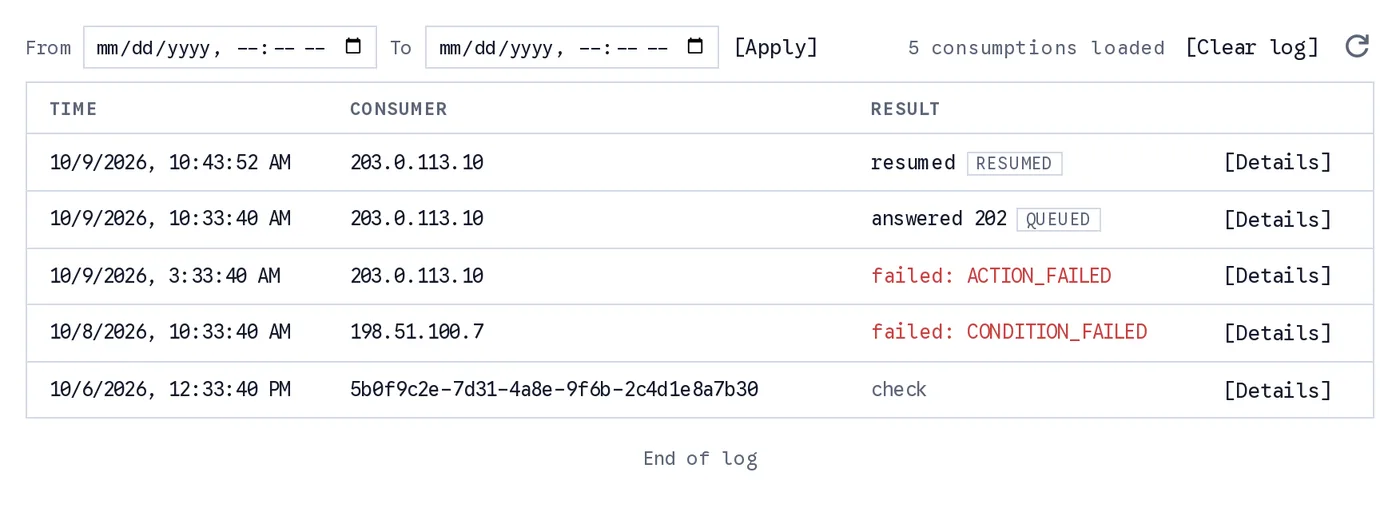
The Log tab, newest first, with the ticket's concurrency line above the rows. A call that waited for a concurrency slot reads receipt with an in line mark, and the run that followed it is marked after the line; a consumption a Respond answered reads answered 202 with a queued mark, the run that went on later reads resumed, a failed consumption names its error code, and a dry run reads check. From and To narrow the range; Clear log deletes rows before a time.
Each row shows the Time, the Consumer (the user id on a consumeTicket() call with auth: true, otherwise the caller's IP address; the user agent is in the details) and the Result: ok, failed: <code>, check for a dry run, answered <status> when a Respond answered, or resumed for a queued run; a queued mark says the consumption's chain goes on later, a resumed mark that the row is such a run. Hovering a failed result shows what its code means. From and To narrow the list to a time range. [Details] opens the full log row described above, with the note under its header when the request carried one, and lists the action rows under it, each opening to its own JSON. Load more fetches the next page, the refresh icon reloads the log, and [Clear log] deletes rows before a time (Clearing the log).
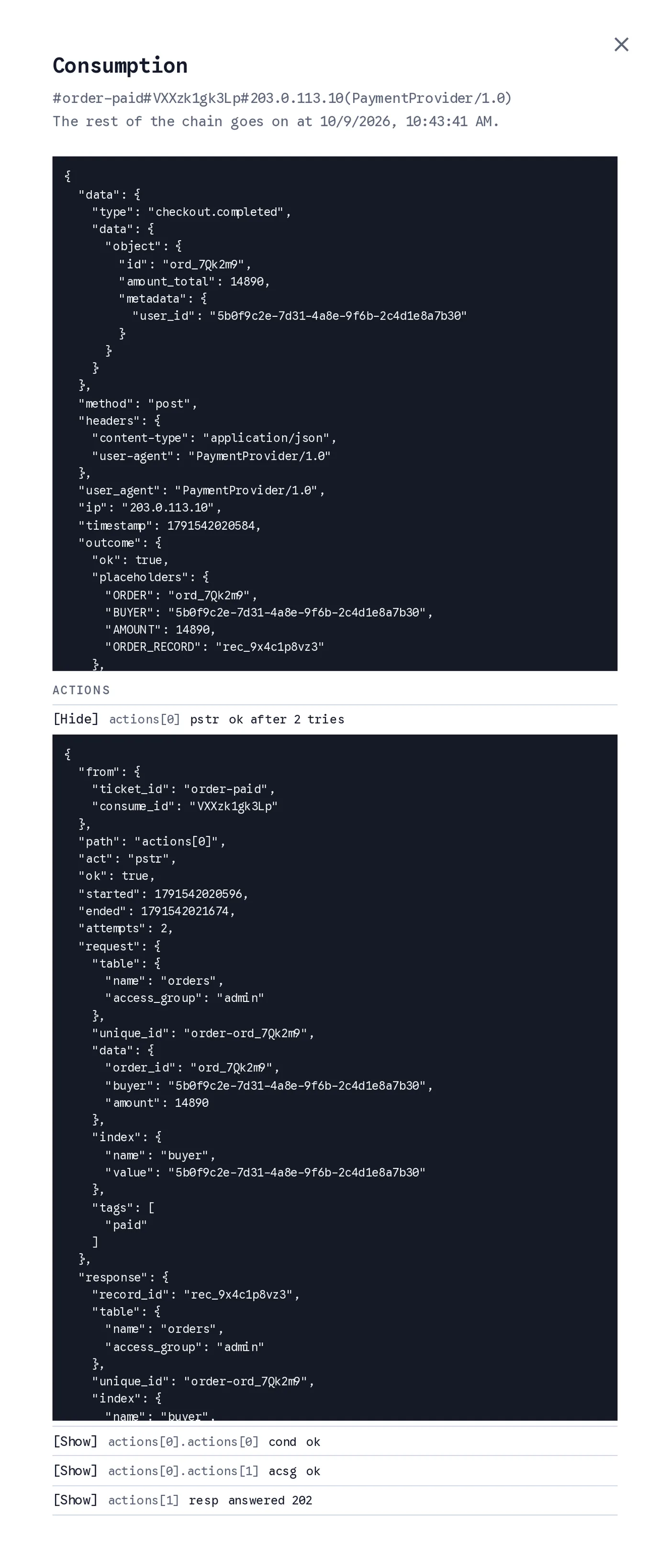
Details of an answered consumption. The outcome lists every action that ran, and the Actions list under it opens each action's own row: the Post record was tried twice and posted the order, and the Check answer in its Then chain captured the record id.
Only the project owner sees the log, in the dashboard or by calling getTickets() with ticket_id: '#<id>#'.
Clearing the log
[Clear log] on the Log tab, or clearTicketLog({ ticket_id, before }) from the SDK, deletes the ticket's log rows (consumptions and their action rows) before a time, which is now unless you pick an earlier one. The rows go in the background over the next minutes. The ticket itself, its remaining count and its per-user limits are unchanged; nothing that was consumed is handed back.
Deleting a ticket deletes all of its logs with it, and drops its queued runs that are still waiting when they come due; the dialog says so before it does.
How long the log is kept
A ticket's log rows count toward the project's database storage, shown as their own part of the Database figure on the Plan & Usage card, and they are kept for the plan's retention: 30 days on Trial, 90 days on Standard, and for good on Premium. A row past its retention expires on its own, and expiring hands nothing back to the count. See Plans and Limits.
getConsumedTickets()
A signed-in user can list their own consumptions with getConsumedTickets(). Only consumptions made with consumeTicket() and auth: true are attributed to a user, so anonymous ones never appear here. ticket_id narrows the list to one ticket.
let consumed = await skapi.getConsumedTickets({ ticket_id: 'unlock-guide' });

for (let row of consumed.list) {
    let log = JSON.parse(row.description);   // the log row above
    console.log(row.ticket_id, row.consume_id, new Date(row.timestamp), log.outcome.ok);
}
Who May Call getTickets()
getTickets() lists the tickets of the project. Any signed-in user may call it, and sees the public part of each ticket: ticket_id, description, count, time_to_live and timestamp. Conditions, actions and the log are only returned to the project owner: in the dashboard, or when the owner calls getTickets() from the SDK. The owner's rows carry limit_per_user, updated, condition and actions as well, and the owner may pass ticket_id: '#<id>#' to read that ticket's log rows, the way the dashboard's Log tab does, or '@<id>#<consume_id>#' for the action rows of one consumption, with from and to (milliseconds) for a time range. Every other signed-in user, an admin of the project included, is refused a ticket_id containing # or @ with INVALID_REQUEST: Invalid ticket id..
let tickets = await skapi.getTickets({});
console.log(tickets.list);
/*
[
    { ticket_id: 'launch-coupon', description: 'Launch coupon', count: 87, timestamp: 1757721600000 },
    { ticket_id: 'unlock-guide', description: 'Unlock the members guide', timestamp: 1757808000000 }
]
*/