
Tickets
A ticket is an HTTP endpoint that you register once as the project owner, and that anyone can call afterwards: a webhook sender such as your payment provider, a browser, or a signed-in user of your project. Each call is a consumption.
On every consumption Skapi:
- checks the service and the ticket itself (service active, ticket exists, switched on, not expired, count left, per-user limit, issuer, token belongs to this project),
- evaluates the ticket's condition against the incoming request and captures placeholders from it,
- runs the ticket's actions in order (an action chain), each with its own error chain,
- writes a consumption log row you can inspect from the dashboard,
- answers with
{ tkid, hash }on success or a standardized JSON error.
A ticket is how a request from outside your frontend reaches your database without a server of your own. A payment your payment provider reports becomes an orders record and lifts the buyer's access group. A coupon link writes one record per visit. A signed-in user unlocks a private record by calling one URL.
There is no rollback: actions that already ran stay applied when a later one fails. Design tickets so that a repeated call is harmless. See Actions.
Registering a Ticket
Tickets are registered from the dashboard. Open your project, click Tickets in the project menu, then + Register Ticket.
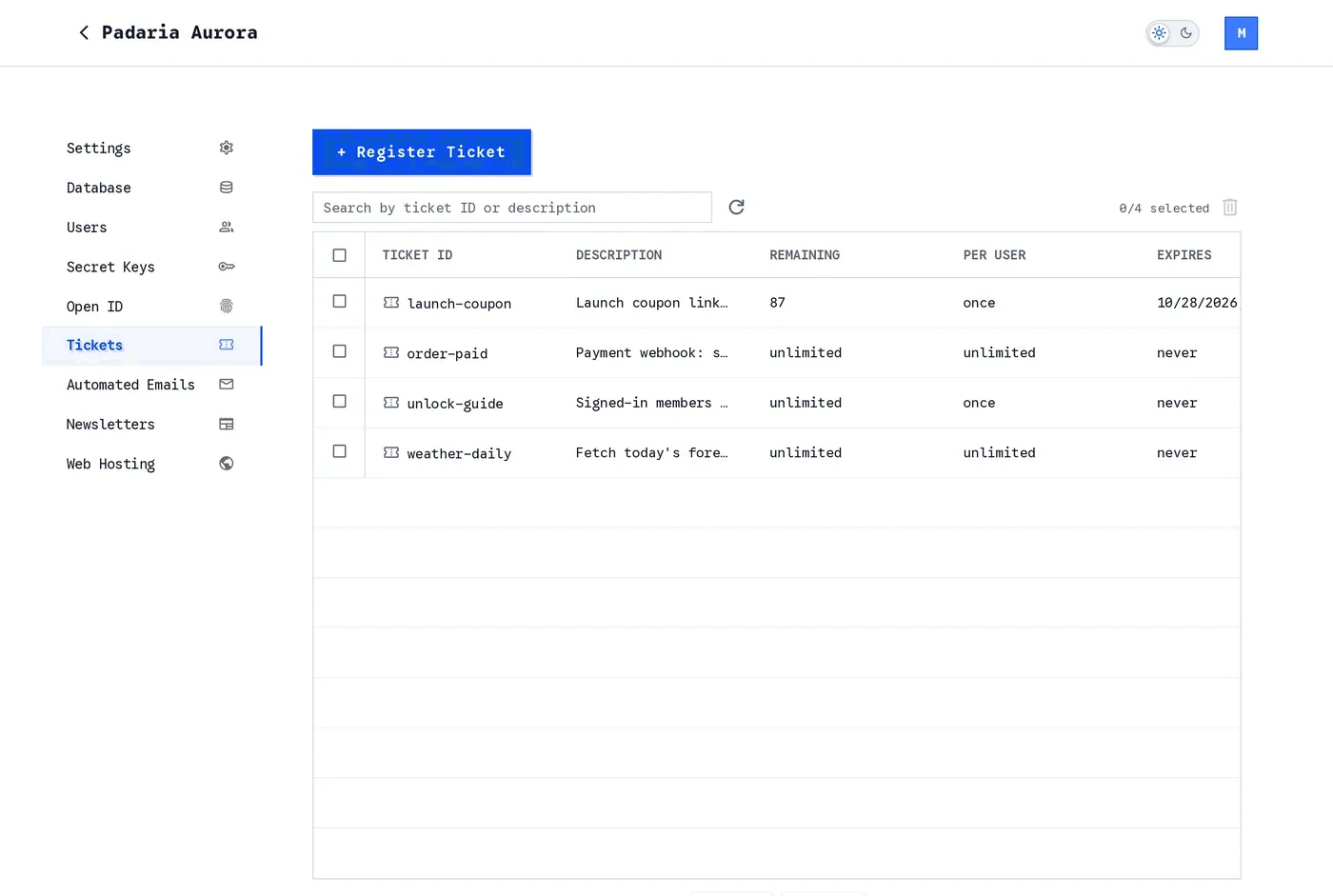
The Tickets page. Every registered ticket is one row with its Status: a green or red dot for enabled or disabled, then idle, queued, recursing or busy, with the number of calls waiting in the ticket's line when there are any. Click a row to open it, search by id or description, and tick rows to delete several at once.
The Status cell is a green dot (enabled) or a red dot (disabled), then one word: idle when no queued run of the ticket is waiting, queued when at least one queued run is waiting to come due, and recursing when a queued run is waiting and one of the ticket's actions, at any depth, is an HTTP request to a ticket URL of this project (a URL with /tp/<service_id>/, /tg/<service_id>/ or /tpa/<service_id>/), the shape of a ticket that keeps itself going. A ticket with a Concurrency setting reads busy while every slot it has is taken, with the number of calls waiting in its line when there are any; see One at a time: concurrency. The switch that turns a ticket on and off is at the top of its detail view; see Disabling a ticket.
An AI agent can do this for you. The Skapi MCP server registers, updates and deletes tickets and reads their logs from a prompt, so a webhook endpoint is one sentence away. See Connecting the Skapi MCP server.
Only the project owner can register, update or delete a ticket. An admin of your project (access group 99) is refused with INVALID_REQUEST: Only the project owner can register tickets., and the SDK has no public register method.
The detail view has these sections:
- Ticket: the identity and the limits of the ticket, listed below.
- Endpoints: the POST, GET and Dry run URLs the ticket answers on, with copy buttons. They appear as soon as you type an id. The route
consumeTicket()uses withauth: trueis not listed: the SDK builds it, and nothing calls it by hand. - Condition: what an incoming request must look like. See Conditions and Placeholders.
- Actions: what happens once the condition passes. See Actions.
- Log: on an existing ticket, every consumption. See Reading the Log in the Dashboard.
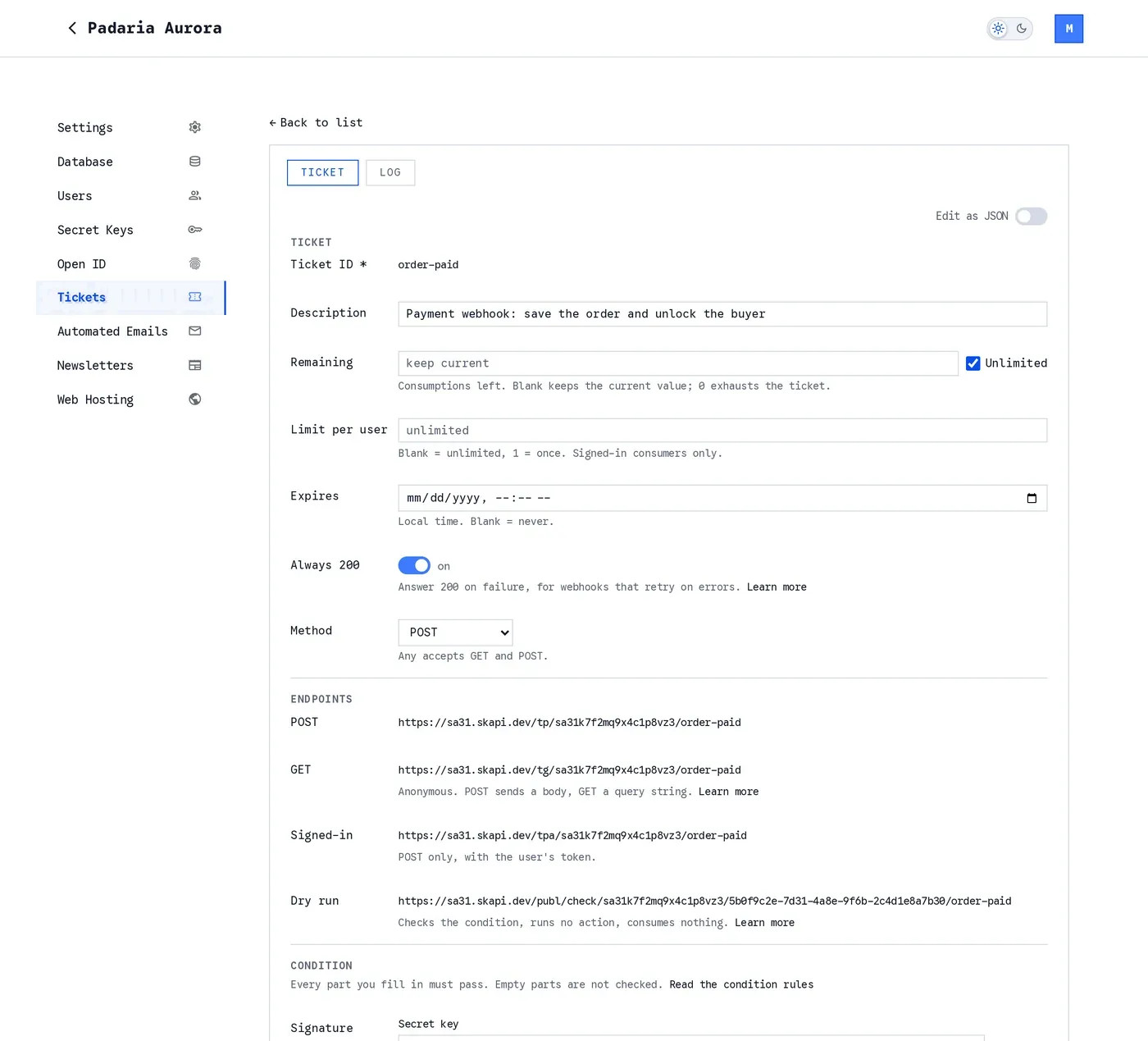
A ticket opened from the list, with its Enabled switch next to Edit as JSON, and Concurrency with When full under Limit per user. The same form registers a new ticket, and its Endpoints, POST, GET and Dry run, appear as soon as you type an id.
Ticket fields
- Ticket ID: the last segment of the endpoint URL. Must match
^[A-Za-z0-9][A-Za-z0-9_-]{0,63}$;#,!and/are reserved. It cannot be changed after creation. - Description: up to 500 characters, shown in the list.
- Remaining (
count): every successful consumption takes one. At0the ticket answersTICKET_EXHAUSTED. Blank keeps the current value when you update a ticket, and means unlimited on a new one.0exhausts the ticket. Tick Unlimited to remove the count from an existing ticket. - Limit per user (
limit_per_user): how many times one user may consume the ticket.1means once. Blank means unlimited. Counted only onconsumeTicket()calls withauth: true, the one call that carries a user, so it has no effect on the open endpoints, a webhook included. - Concurrency (
concurrency): how many consumptions of the ticket may be in flight at the same time,1to100. Blank means unlimited. A consumption is in flight while its actions run, and while the rest of its chain waits to go on after a Respond. See One at a time: concurrency. - When full (
when_full): what a call gets once that many are in flight. Wait in line ("queue", the default) answers it at once with a receipt and runs it in its turn; Refuse ("refuse") fails it withTICKET_BUSY. Shown only when Concurrency is set. - Expires (
time_to_live): a date and time after which the ticket answersTICKET_EXPIRED, entered in your local time. Blank means never. When set it must be in the future. - Always 200 (
return200): answer HTTP 200 even when the consumption fails, for webhooks that retry on errors. - Method: Any, GET or POST. Any accepts both; with GET or POST, a request with the other method fails with
METHOD_NOT_ALLOWED. Seereturn200andmethod. - Enabled: the switch at the top of the detail view, next to Edit as JSON; in the list, the dot of the Status cell shows the state. Switching on is immediate; switching off asks you to confirm. Off, the ticket answers
TICKET_DISABLEDto every call, dry runs included, and a queued run of it that comes due is skipped and logged as a failed row withskipped: disabled. The definition, the remaining count, the per-user counters and the log are kept, so a webhook can be paused and resumed without re-registering it. On again at any time. An AI agent switches it with theenableanddisableactions of the MCP server's ticket tool. See Disabling a ticket.
Updating a ticket replaces its whole definition, but the per-user usage counters survive an update, so editing the count does not hand every user a fresh allowance. Deleting a ticket deletes the counters and keeps the log.
Disabling a ticket
The switch at the top of the detail view, next to Edit as JSON, pauses a ticket without deleting it. Switching off asks for confirmation; switching on is immediate.
While a ticket is off:
- every call answers
TICKET_DISABLED, on every endpoint and on the dry run URL as well; - a queued run of the ticket that comes due is not run: it is skipped and logged as a failed row with
skipped: disabled, so a ticket that keeps itself going (see Repeating Every 30 Minutes) stops at its next round; - the definition, the remaining count, the per-user counters and the log are all kept.
Switch it on again at any time, and the next call is answered as before. In the list, the dot of the Status cell shows the state. An AI agent uses the enable and disable actions of the MCP server's ticket tool.
One at a time: concurrency
Two settings on the ticket decide how many calls may run at once, and what the rest get.
- Concurrency (
concurrency): how many consumptions may be in flight at the same time, from1to100. Blank means unlimited, which is how every ticket runs without the setting. - When full (
when_full):"queue"(Wait in line, the default) or"refuse"(Refuse).
A consumption is in flight while its actions run, and for as long as the rest of its chain waits to go on after a Respond with a resume. The wait holds the slot: a ticket with Concurrency 1 whose chain answers with "resume": "1d" is full for that day, and nothing else of it runs until the queued run is done. That is what keeps a ticket that repeats on its own from running twice at once.
A dry run never takes a slot and never waits.
Wait in line. When every slot is taken, a call is answered at once with HTTP 202 (or 200 when the ticket has Always 200 on) and a receipt that says where it stands:
{
  "queued": true,
  "position": 2,
  "consume_id": "UwdAhf6k3Qp",
  "ticket_id": "order-paid",
  "tkid": "#order-paid#UwdAhf6k3Qp#203.0.113.7(curl/8.5.0)",
  "hash": "..."
}
By then the call has passed every check and the whole condition, and it counts: it took one from the remaining count and from the caller's per-user limit, as a consumption a Respond answered does. Its actions run when its turn comes, first in, first out, with the request, the captured placeholders and the caller exactly as they were. The Log tab shows two rows: the call with a queued mark, and the run that followed, marked resumed and naming it. A Respond in that chain answers nobody, since the caller already has its receipt; what it would have answered is logged. A newcomer never passes a call already waiting, even when a slot happens to be free at that instant.
Each run that waited counts as one of the plan's queued ticket runs for the month, like a run a Respond leaves for later. On Trial and Standard a call that would join the line past the month's figure is refused with QUOTA_EXCEEDED (detail.field is "tkq") instead of waiting.
Refuse. When every slot is taken, a call fails with TICKET_BUSY, HTTP 429 (or 200 with Always 200), and none of its actions run: nothing is consumed. The error's detail carries concurrency, running (consumptions in flight), waiting (calls in the line) and self_calling. Unlike the other refusals made before a chain runs, it is written to the Log tab as a failed row, so you can see the limit at work. A req from another ticket that gets it does not try again, whatever its retry says.
A ticket that calls itself keeps its line to itself. A ticket whose actions hold, at any depth, a req to its own endpoint is a self-calling ticket, the shape of one that keeps itself going: it answers, waits, does its work and calls its own URL for the next round. For such a ticket the line is only for its own next round. While it is full, any other call is refused with TICKET_BUSY, under Wait in line as under Refuse, and the message says why. So a bot started by opening its GET link once cannot be started a second time by opening the link again while it runs: the second click is told the ticket is busy, and a second copy of the loop is never born. When full has no effect on such a ticket: its own next round always waits and everyone else is always refused, so all a self-calling ticket needs is Concurrency 1.
Closed loops: Concurrency 1 and a self-calling ticket. To put it plainly: while a self-calling ticket with Concurrency 1 is running, any other request to it is answered with TICKET_BUSY, whether When full is Wait in line or Refuse; the setting has no effect on a self-calling ticket, whose own next round always waits. So for a closed-loop recursive task, a job that must keep running on its own and must exist exactly once, Concurrency 1 on a self-calling ticket is the way to go: one copy, started by one call, refusing every other start until you switch it off.
Never run a self-calling ticket without a concurrency limit. Without it, nothing stops a second copy. Every extra call to the ticket's endpoint, a second click on the link, a browser that prefetches it, a webhook sender that retries, a crawler that found the URL, starts another loop, and each loop re-queues itself forever. The copies multiply instead of ending: every one of them makes the chain's API calls, posts, e-mails and records, every one of them takes queued runs from the month's figure, and the only way out is switching the ticket off, which stops all of them at once. A loop with "resume": "0m" and no limit does all of this as fast as the queue can start rounds. Concurrency 1 turns that into one loop that cannot be doubled.
A ticket that posts something once a day, started by one click:
{
  "ticket_id": "daily-post",
  "description": "Posts one record a day",
  "condition": { "method": "GET" },
  "concurrency": 1,
  "actions": [
    { "act": "resp", "exe": { "status": 200, "body": { "ok": true }, "resume": "1d" } },
    { "act": "pstr", "exe": { "table": { "name": "daily", "access_group": "public" }, "data": { "at": "${ticket[timestamp]}" } } },
    { "act": "req", "exe": { "method": "GET", "url": "https://eu73.skapi.dev/tg/eu73kXm2PqA9vLb4/daily-post" } }
  ]
}
Open the GET endpoint once in a browser: the Respond answers { "ok": true } and the rest waits a day, holding the ticket's one slot. A day later the record is posted and the req calls the ticket's own URL; that call finds the slot still taken by the round that is making it, waits in the line, and starts the moment the round is over, holding the slot for the next day. Open the link again meanwhile and you get TICKET_BUSY. To stop the bot, switch the ticket off: the round that was waiting is skipped and logged with skipped: disabled (see Disabling a ticket). Between the Respond and the self-call the chain can do anything an action can: fetch or generate what it posts with a req to an API and your Secret Key, post a record, send an e-mail. See Repeating Every 30 Minutes.
In the list, the Status cell of a ticket with the setting reads busy while every slot is taken, with the number of calls waiting in its line when there are any, and the ticket's Log tab shows the setting with the live figures above the rows. The running figure is kept for every ticket, limit or not: calls running now, or answered with a Respond and waiting to go on. The waiting figure exists only with a limit, since only then does anyone wait. The ticket's getTickets() row carries concurrency, when_full, running (in flight now), waiting (in the line) and self_calling.
An AI agent sets these with the MCP server's ticket tool (concurrency and when_full on register and update); you can also describe the whole bot in a sentence, such as "make me a bot that posts a developer joke every morning", and let it ask what it needs and register the ticket. See Connecting the Skapi MCP server.
Changing Concurrency on a ticket with calls in flight applies to new calls; the runs in flight finish as they are. Removing the setting lets everything still waiting run at once, in order. Deleting the ticket drops what waits in its line.
Edit as JSON
The Edit as JSON toggle at the top of the form shows the same ticket as one JSON document, which is the form the examples in this guide use:
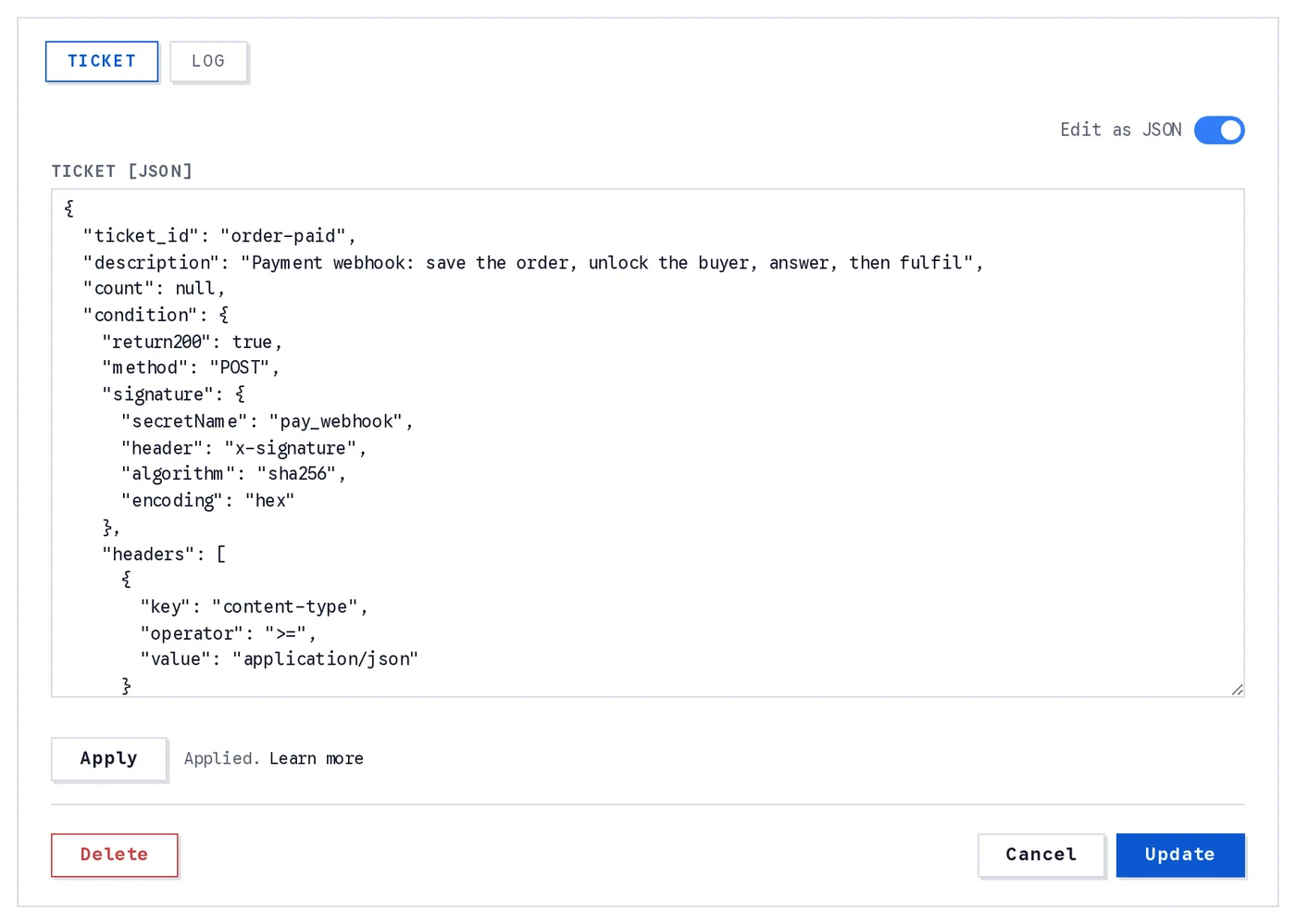
JSON mode. Edit or paste the whole ticket, click Apply to load it into the builder, then Register or Update to save.
type Ticket = {
  ticket_id: string;                 // letters, digits, _ and -, up to 64 characters
  description?: string;              // up to 500 characters
  count?: number | null;             // uses left; null = unlimited
  limit_per_user?: number | boolean | null; // per signed-in user; true = 1; false, 0 or null = no limit
  time_to_live?: number | null;      // expiry, ms since the epoch; null = never
  enabled?: boolean;                 // false registers the ticket switched off; absent keeps the stored state (a new ticket is on)
  concurrency?: number | null;       // calls in flight at once, 1 to 100; absent or null = unlimited
  when_full?: "queue" | "refuse";    // with concurrency: a place in the line and a 202 receipt (default), or TICKET_BUSY
  condition?: {
    return200?: boolean;               // answer 200 even when it fails
    method?: "GET" | "POST";           // absent = both
    signature?: {
      secretName: string;                // a Secret Key's name
      header: string;                    // the header holding the signature
      algorithm?: "sha256" | "sha1" | "sha512";
      encoding?: "hex" | "base64";
      separator?: string;
      parts?: string[];
      signed?: string;
      timestamp?: string;
      tolerance?: number;
      secret_encoding?: "raw" | "base64" | "hex";
      secret_prefix?: string;
    };
    ip?: { operator: "=" | "!=" | ">" | ">=" | "<" | "<="; value: string | string[] };
    user_agent?: { operator: "=" | "!=" | ">" | ">=" | "<" | "<="; value: string | string[] };
    headers?: Matcher[];                   // request headers
    body?: Matcher[];                      // POST body
    params?: Matcher[];                    // query string
    user?: Matcher[];                      // consumeTicket() with auth: true only
    record_access?: string;            // consumeTicket() with auth: true only
  };
  actions: Action[];                 // required; [] = no actions; up to 50 in total
};

type Matcher = {
  key: string;                       // "keyname" or a path, such as "param[keyname][0]"
  operator?: "=" | "!=" | ">" | ">=" | "<" | "<="; // absent = capture only
  value?: string | number | boolean | null | (string | number | boolean | null)[];
  setValueWhenMatch?: any;           // the placeholder holds this instead of the field's value
  placeholder?: string;              // captures the field's value as ${placeholder[NAME]}
};

type Action =
  | { act: "pstr"; exe: PostRecord; err?: Action[]; retry?: boolean } // post a record
  | { act: "acsg"; exe: { group: number | "admin"; user_id?: string } & Then; err?: Action[]; retry?: boolean } // set the access group of a user
  | { act: "acsr"; exe: { record_id: string; user_id?: string | string[] } & Then; err?: Action[]; retry?: boolean } // grant private access to a record
  | { act: "req"; exe: HttpRequest; err?: Action[]; retry?: boolean } // send an HTTP request and run a nested chain on its response
  | { act: "mail"; exe: { template: string; to: string; placeholders?: { [name: string]: string | number | boolean } } & Then; err?: Action[]; retry?: boolean } // send a custom e-mail
  | { act: "nlsd"; exe: { group: "public" | "authorized" | number | string; newsletter: string } & Then; err?: Action[]; retry?: boolean } // send a stored newsletter
  | { act: "resp"; exe: Respond; err?: Action[] }    // answer the caller now, then stop or go on later
  | { act: "cond"; exe: CheckAnswer; err?: Action[] }; // a check on the enclosing action's answer, inside a Then chain only

type Then = {
  actions?: Action[];                // the Then chain, reading the answer as ${response}; a Check answer in it checks the answer
};

type Respond = {
  status?: number | string;          // 100 to 599, default 200; or a reference
  body?: any;                        // any JSON, templated; absent = the receipt { tkid, hash }
  resume?: "stop" | "0m" | string | number; // "stop" (default), "0m" (at once, in the background), "10m" | "2h" | "3d" (after a delay), or a time in ms
};

type CheckAnswer = {
  response: Matcher[];               // rows on the enclosing action's answer: key = a path in it ("body[status]", "record_id"), "" the whole answer as text
};

type PostRecord = {
  table: {
    name: string;
    access_group: "public" | "authorized" | "admin" | "private" | number; // required in JSON mode
    subscription?: {                 // needs user_id: the project owner's records cannot have one
      is_subscription_record?: boolean;     // only the uploader's subscribers can read it
      upload_to_feed?: boolean;             // shows in subscribers' getFeed()
      notify_subscribers?: boolean;         // pushes to subscribers when created
      feed_referencing_records?: boolean;
      notify_referencing_records?: boolean;
    } | null;                        // null clears every setting
  };
  data?: any;
  index?: { name: string; value: any };
  tags?: string[];
  unique_id?: string;
  record_id?: string;                // update this record instead of creating one
  reference?: string;
  readonly?: boolean;
  source?: object;
  user_id?: string;                  // post as this user; absent = the project owner
} & Then;                            // actions: the Then chain, reading the record as ${response}

type HttpRequest = {
  url: string;
  method?: "GET" | "POST" | "PUT" | "DELETE"; // absent = GET
  secretName?: string;               // fills ${CLIENT_SECRET}
  headers?: { [name: string]: string };
  data?: any;                        // body, POST and PUT only
  params?: { [key: string]: any };   // the query string; a value that is not text is sent as compact JSON
  actions?: Action[];                // read the response as ${response}: status, headers, body; a Check answer in it checks the response
};
Every string in exe may hold references such as ${body[order][id]} (a Check answer's parts are literal); see Conditions and Actions for what each part does. Paste a document of this shape, click Apply, and the builder fills in from it. Apply refuses a document that leaves out a required parameter and names it: actions (write [] for a ticket with no actions) and the access_group of every pstr table, as in "table": { "name": "orders", "access_group": "public" }.
JSON mode is the quickest way to register a ticket from an example on these pages, or to copy a ticket from one project to another: switch the toggle on, paste the document, Apply, then Register or Update. The toggle refuses to switch while a field holds something the ticket cannot be saved with, and marks that field, so fix it first. Switching back to the builder with edits you have not applied asks whether to discard them.
Each action card in the builder also has Show other fields (JSON). It holds the keys of that action the card has no control for, or could not load, and they are merged into the action when you save. When a control above fills the same key, the control wins.
Endpoints
Every ticket answers on a regional host, https://<reg>.skapi.dev, where <reg> is the first 4 characters of your project id. The dashboard shows the POST, GET and Dry run URLs in the Endpoints section of the ticket.
| route | auth | notes |
|---|---|---|
POST /tp/<service_id>/<ticket_id> | none | body = JSON (or raw text) |
GET /tg/<service_id>/<ticket_id> | none | query string = data |
POST /tpa/<service_id>/<ticket_id> | the user's Skapi id token in Authorization | what consumeTicket() sends to with auth: true; never called by hand. Consumer = the user. POST only |
GET/POST /publ/check/<service_id>/<owner_id>/<ticket_id> | none | dry run: service and ticket checks + condition only, no actions, no count change; log row with :CHK |
consumeTicket() with auth: true is POST only. It is the only thing that calls the /tpa/ route: the SDK sends the user's id token, you never handle it, and the dashboard does not list that URL.
On the open endpoints the consumer is identified by IP address and user agent. On consumeTicket() with auth: true the consumer is the user, and the token must belong to this project: a token from another Skapi project is refused with AUTH_REQUIRED.
What the request carries
- The body. A POST body is parsed as JSON. A body that is not JSON is kept as its text, so no row key finds anything in it, but an action can still read the whole text as
${body}. A GET has no body, and reads it as{}.bodyrows read the body, and actions read it as${body}or${body[key]}. - The query string, on both methods. Each value is JSON-parsed on its own when it parses (
1becomes the number1,truebecomestrue,{"a":1}becomes an object), otherwise it stays a string:?code=LAUNCH24&qty=2is read as{ "code": "LAUNCH24", "qty": 2 }. A request without a query string reads it as{}.paramsrows read the query string, and actions read it as${params}or${params[key]}. - The caller: its headers, IP address, user agent and method, and on
consumeTicket()withauth: truethe user. See References. What the SDK itself puts in a request is listed under WhatconsumeTicket()sends.
A GET ticket's data is its query string: use params rows and ${params[...]} there.
Consuming From a Browser
Use consumeTicket(). method picks GET or POST, auth: true sends the call as the logged-in user, and data is the JSON body of a POST or the query string of a GET.
// anonymous GET: data becomes the query string
let coupon = await skapi.consumeTicket({
    ticket_id: 'launch-coupon',
    method: 'GET',
    data: { code: 'LAUNCH24' }
});

// auth: true: the consumer is the logged-in user
let unlocked = await skapi.consumeTicket({
    ticket_id: 'unlock-guide',
    method: 'POST',
    auth: true
});

console.log(unlocked);
/*
{
    ticket_id: 'unlock-guide',
    consume_id: 'UwdAhf6k3Qp',
    user_id: 'f2b6c9e1-3a4d-4c8b-9e0f-1a2b3c4d5e6f',
    is_test: false,
    timestamp: 1757721600000,
    hash: '...'
}
*/
auth: true with method: 'GET' throws INVALID_PARAMETER: Signed-in consumption is POST only. before anything is sent.
auth: true is the switch for everything about the user
auth: true is the one way a call carries a user, so it is the way to use Limit per user, the User condition rows and the Record access condition. Without it the call carries no user, whoever is logged in on the page, and those three never apply: the per-user limit is not counted, and a user row or a record_access condition fails the call with AUTH_REQUIRED. The same goes for ${user} in an action, and for an acsg or acsr action with no user_id, whose target is the consumer.
What consumeTicket() sends
- A POST sends
dataas the JSON body, withContent-Type: application/json. A GET sendsdataas the query string and no body; a value that is not text goes in as compact JSON, so{ code: 'LAUNCH24', qty: 2 }becomes?code=LAUNCH24&qty=2. - With
auth: truethe request goes to the/tpa/route and carries the user's Skapi id token in theAuthorizationheader, which is what makes the user the consumer. Without it noAuthorizationheader is sent, and the request goes to/tp/(POST) or/tg/(GET). - Beside these the SDK sends
Accept: */*and one header of its own,Content-Meta, a small JSON naming the project and its owner. Everything else is the browser's:User-Agent,Origin,Refererand the rest.
So on a consumeTicket() call a headers condition row or a ${headers[name]} reference can read content-type, accept, content-meta and the browser's headers, such as user-agent and origin, while ${headers[authorization]} reads <redacted>. ${user} and its keys, such as ${user[user_id]} and ${user[email]}, read the logged-in user's account on a call with auth: true, and raise AUTH_REQUIRED on any other call.
Who can call which endpoint
consumeTicket()withauth: trueis the only thing that calls the/tpa/...route: the SDK sends the user's id token, and that token is what proves who is calling. It is the one call that carries a user, so everything about the consumer rests on it:${user}and theusercondition rows, Limit per user, and therecord_accesscondition. No other way in reaches that route, not another HTTP client, notforwardRequest(), which never attaches a login token.- The open endpoints (
/tp/...and/tg/...) take any HTTP client. A page that must send a key the browser may not hold calls them throughforwardRequest(): the key goes in as$CLIENT_SECRET, and the ticket's condition checks that header. Such a call has no user: it is anonymous to the ticket, whoever is logged in. - A
signaturecondition is for a webhook sender that signs the raw body with the secret you share with it. A browser cannot produce it, and neither canforwardRequest(), which substitutes a value and does not sign.
The object above is the receipt. A ticket with a Respond action answers what that action composed instead, and consumeTicket() resolves with that body as sent, whatever its status: consumeTicket<{ ok: boolean }>(...) names its type. A ticket with a Concurrency setting whose slots are all taken resolves with a receipt marked queued: true and the call's position; its actions run when its turn comes.
A failed consumption rejects with a SkapiError whose code is the ticket error code and whose cause is the whole error body. See What consumeTicket() Rejects With.
WARNING
A browser sends whatever the page tells it to, so the request data of a consumeTicket() call is not something a condition can trust on its own. Decide who may run your actions with a signature, or with consumeTicket() with auth: true and rows on the consumer's account.
Consuming From a Webhook
A webhook sender only needs the URL. Paste the POST endpoint into the sender's settings, or call it with plain HTTP:
curl -X POST https://eu73.skapi.dev/tp/eu73kXm2PqA9vLb4/order-paid \
  -H 'content-type: application/json' \
  -d '{ "type": "payment.completed", "payment": { "id": "pay_a1B2c3" } }'
Success answers 200 with application/json, the receipt:
{ "tkid": "#order-paid#UwdAhf6k3Qp#203.0.113.7(curl/8.5.0)", "hash": "..." }A ticket with a Respond action answers that action's status and body instead, at the moment it runs; the rest of the chain can go on in the background. A ticket with a Concurrency setting whose slots are all taken answers 202 with the receipt marked queued: true, or TICKET_BUSY when it refuses when full.
A failure answers 400, or 200 when the ticket has Always answer 200 on, with a flat JSON error:
{
  "code": "CONDITION_FAILED",
  "message": "The \"data\" condition did not match.",
  "stage": "condition",
  "detail": {
    "field": "body",
    "keys": [
      "type"
    ]
  },
  "ticket_id": "order-paid"
}
Every error body has stage; a success body never does. See Errors and Logs.
Dry Run
/publ/check/<service_id>/<owner_id>/<ticket_id> runs the service and ticket checks and the condition, and stops there: no action runs and the count does not change. It accepts GET and POST, so both kinds of ticket can be tried. The dashboard shows the URL with your owner id filled in.
# a GET ticket: the query string is the data
curl 'https://eu73.skapi.dev/publ/check/eu73kXm2PqA9vLb4/f2b6c9e1-3a4d-4c8b-9e0f-1a2b3c4d5e6f/launch-coupon?code=LAUNCH24'

# a POST ticket: the body is the data
curl -X POST https://eu73.skapi.dev/publ/check/eu73kXm2PqA9vLb4/f2b6c9e1-3a4d-4c8b-9e0f-1a2b3c4d5e6f/order-paid \
  -H 'content-type: application/json' \
  -d '{ "type": "payment.completed", "payment": { "id": "pay_a1B2c3" } }'
A passing dry run answers the JSON string "SUCCESS: Ticket check passed. No action taken.". A failing one answers the same error body a real consumption would. Once the ticket has been read, a dry run is always logged, whatever fails after that: a passing one shows as check in the Log tab, with the captured placeholders in its details before an action ever runs, and a failing one shows as failed: <code> with "check": true in its details, an expired ticket or a signature that does not verify included. Only a dry run that never reaches the ticket (INVALID_SERVICE, SERVICE_DISABLED, TICKET_NOT_FOUND) leaves no row.
TIP
The dry run evaluates the whole condition, a signature included. To try a signed webhook, point the sender's test mode, or its "send test event" feature, at the check URL and read the Log tab. You can also sign a request yourself. For a ticket with the signature of the payment webhook example:
body='{ "type": "payment.completed", "payment": { "id": "pay_a1B2c3" } }'
ts=$(date +%s)
sig=$(printf '%s.%s' "$ts" "$body" | openssl dgst -sha256 -hmac "$SIGNING_SECRET" | sed 's/^.* //')
curl -X POST https://eu73.skapi.dev/publ/check/eu73kXm2PqA9vLb4/f2b6c9e1-3a4d-4c8b-9e0f-1a2b3c4d5e6f/order-paid \
  -H 'content-type: application/json' \
  -H "x-signature: t=$ts,v1=$sig" \
  --data-raw "$body"
A row marked failed: CONDITION_FAILED whose details say "field": "signature" means the secret name, the secret itself, or the way the signature fields describe the header is wrong; a check row means the signature verified and the placeholders were captured.
Next
- Conditions and Placeholders: what a request must look like, and how values are read out of it.
- Actions: what a ticket does, chaining and error chains.
- Errors and Logs: every error code, and the consumption log.
- Examples: a payment webhook, a coupon link, a signed-in unlock, and a call to an API with your Secret Key.