
Conditions and Placeholders
A ticket's condition says what an incoming request must look like. When it fails, the consumption stops before any action runs, and the answer names the first thing that did not match. While it runs, it can also capture values from the request into placeholders for the actions to use.
The condition is one object. Every key is optional, and an empty condition passes every request:
{
    return200?: boolean,                 // answer 200 even when the consumption fails (webhook friendly)
    method?: "GET" | "POST",             // absent = both allowed
    signature?:  { secretName, header, algorithm?, encoding?, separator?, parts?, signed?, timestamp?, tolerance?, secret_encoding?, secret_prefix? }, // an HMAC of the request
    ip?:         { operator, value: string | string[] },
    user_agent?: { operator, value: string | string[] },
    headers?: [ { key, operator, value } ],                                  // key = header name, matched case-insensitively
    data?:    [ { key, operator?, value?, setValueWhenMatch?, placeholder? } ], // rows against the POST body; key = a path in it
    params?:  [ { key, operator?, value?, setValueWhenMatch?, placeholder? } ], // rows against the query string, on GET and POST
    user?:    [ { key, operator, value } ],                                  // consumeTicket() with auth: true only: the consumer's attributes
    record_access?: string               // consumeTicket() with auth: true only: a record the consumer must own or have been granted
}
The Condition in the Dashboard
Open a ticket on the Tickets page and scroll to Condition. Every key of the object above is one part of the form, and a part you leave empty is not checked.
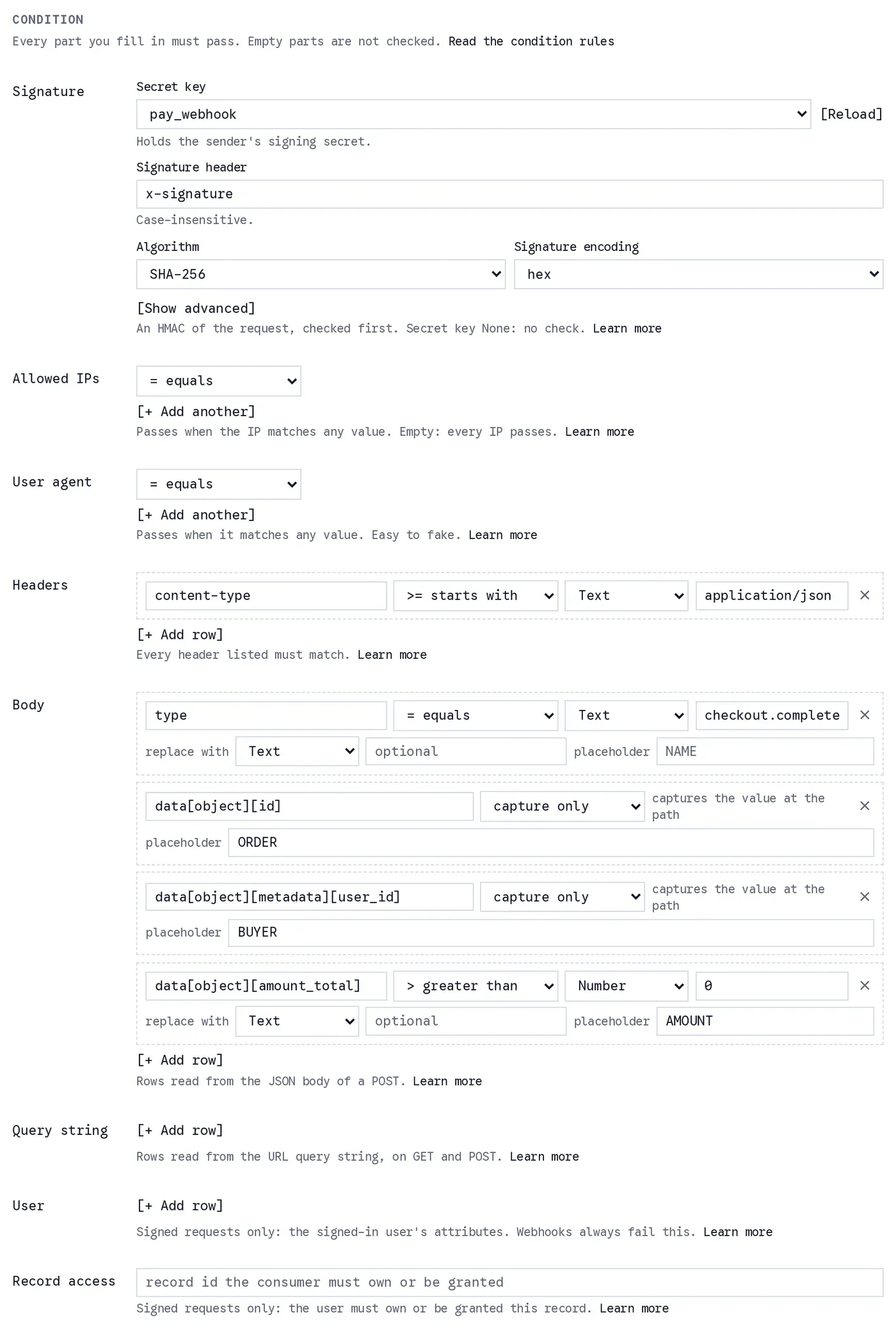
The Condition section of a payment webhook ticket. The Body rows check the event type, capture the order id and the buyer as placeholders, and require a positive amount.
- Signature: pick the Secret key that holds the sender's signing secret (a key from the Secret Keys page; None turns the check off), type the Signature header the sender writes, and pick the Algorithm and the Signature encoding. [Show advanced] opens the header separator, header parts, signed payload template, timestamp template, tolerance, secret encoding and secret prefix. See Signature.
- Allowed IPs and User agent: one operator and a list of values. [+ Add another] adds a value, and the part passes when any value matches.
- Headers: one row per header name, with an operator, a value type and a value. Every header listed must match.
- Body and Query string: the
bodyandparamsrows. A row is a key path, an operator, a value type and a value. Choosing capture only as the operator makes a capture-only row; a match row can also carry replace with (setValueWhenMatch) and a placeholder name. [+ Add row] adds a row. On a GET ticket the Body part collapses, because a GET has no body. - User: rows against the consumer's account, such as
access_group, read onconsumeTicket()calls withauth: true. - Record access: the id of a record the consumer must own or be granted, checked on
consumeTicket()calls withauth: true.
The operator list reads differently with the value type: on text, >= is starts with and <= is ends with; on a number they are at least and at most. A ${ } typed into a row value is compared as text, never filled in, and the form says so under the row.
How Each Part Decides
The parts are evaluated in this order: method, signature, ip, user_agent, headers, body, params, user, record_access. The first part that fails stops the consumption and is the one reported; the parts after it are not evaluated. A part that is empty or absent is not checked.
| part | passes when | empty or absent |
|---|---|---|
method | the request uses that method | both methods pass |
signature | the HMAC verifies | no signature check |
ip | the caller's IP address matches any listed value | every address passes |
user_agent | the caller's user agent matches any listed value | not checked |
headers | every header listed is sent and matches | not checked |
body | every key listed in the POST body passes | not checked |
params | every key listed in the query string passes | not checked |
user | every key listed passes, read from the consumer's account (consumeTicket() with auth: true) | not checked |
record_access | the consumer (consumeTicket() with auth: true) owns the record or holds a grant on it | not checked |
headers, body, params and user share one rule for their rows, described below: rows on the same key are alternatives, every different key must pass, and a missing field is a mismatch.
return200 never decides whether a ticket fails. It only changes the HTTP status a failure is answered with. See return200 and method.
user and record_access work only with consumeTicket() and auth: true
They read the account of the user who consumes the ticket, so they only pass for an app user of this project calling consumeTicket() with auth: true, the one call that carries a user. A third-party webhook has no session, and neither has a call made any other way: a ticket that uses either of them always fails for webhooks, with AUTH_REQUIRED.
Operators and Rows
operator is one of =, !=, >, >=, <, <=. The word forms eq, ne, gt, gte, lt, lte are accepted and stored as the symbols.
| operator | on two strings | on two numbers | anything else |
|---|---|---|---|
= | the same text | the same number | the same value, compared strictly |
!= | different text | a different number | a different value, compared strictly |
>= | starts with | greater than or equal | never passes |
<= | ends with | less than or equal | never passes |
> | after, in character order | greater than | never passes |
< | before, in character order | less than | never passes |
=and!=compare strictly, as JavaScript's===does: the number1is not the text"1", andtrueis not1.- The ordering operators compare two strings or two numbers. A string against a number, a boolean,
nullor a missing field never passes, and is never an error. - A field the request does not carry fails every operator,
!=included, unless the row compares withnullorundefined(see below). valuemay be a list. With=and the ordering operators the row passes when any member matches. With!=it passes when the field is none of them. See Lists, objects and arrays.
"ip": { "operator": "!=", "value": ["203.0.113.7", "198.51.100.23"] }This one lets every address through except those two.
Rows on the same key
Rows in headers, body, params and user combine by key. Rows with the same key are alternatives: one of them matching satisfies that key. Rows with different keys must all be satisfied.
"body": [
  {
    "key": "type",
    "operator": "=",
    "value": "payment.completed"
  },
  {
    "key": "type",
    "operator": "=",
    "value": "payment.captured"
  },
  {
    "key": "amount",
    "operator": ">",
    "value": 100
  }
]
Here type may be either event, and amount must be above 100 as well. A body without amount fails on amount: a field that is not there does not match.
When a key is not satisfied, the answer is CONDITION_FAILED with the part in detail.field and every key that failed in detail.keys, such as { "field": "body", "keys": ["amount"] }.
Rows run in order, and every one of them is read. On one key, the first match row that matches wins: its setValueWhenMatch replaces the value, in the data itself where the field exists, and its placeholder captures the result. The remaining match rows on that key are skipped without being evaluated, so nothing is re-checked against the replaced value; the log marks them skipped. A later row on another key whose path runs through the replaced field reads the replacement, and so do the actions that follow. A capture-only row (a placeholder and no operator) is never skipped: it fills its placeholder whenever its path exists, and never fails. At the ticket's condition, keys and values are literal: ${...} inside a row is plain text, never a reference. In a Check answer action the key stays literal, but value and setValueWhenMatch may reference the answer and the pool.
Lists, objects and arrays
A row's value can be any JSON value. On the dashboard, pick the JSON type to enter one. How it is compared depends on its shape.
A list at the top of value is a set of alternatives, not a value to compare. The field is compared with each member on its own:
| row | passes when the field is |
|---|---|
status = ["paid", "complete"] | "paid" or "complete" |
status != ["paid", "complete"] | neither of them |
code >= ["ch_", "pi_"] | text starting with ch_ or with pi_ |
An object is compared whole. = passes only when the field is an object with exactly the same keys, and every value is the same, compared strictly and all the way down. A field with an extra key, a missing key, or 1 where the row has "1" does not match. != passes for any other value, and fails on a missing field like every operator. The ordering operators never pass on an object.
"body": [
  {
    "key": "metadata",
    "operator": "=",
    "value": {
      "plan": "pro",
      "seats": 5
    }
  }
]
This passes for { "plan": "pro", "seats": 5 } and for nothing else, not { "plan": "pro", "seats": "5" } and not { "plan": "pro", "seats": 5, "trial": true }. To check one value inside an object, write a row for its path instead, such as metadata[plan] = "pro".
To compare with a whole array, put it inside a list. A top-level list is always read as alternatives, so [1, 2] means "1 or 2". Wrap the array to make it the one alternative: [[1, 2]] passes only when the field is the array [1, 2], with the same members in the same order. [[1, 2], [2, 1]] accepts either order.
"body": [
  {
    "key": "tags",
    "operator": "=",
    "value": [
      [
        "a",
        "b"
      ]
    ]
  }
]
A list and rows on the same key. For = and the ordering operators, one row with a list passes for the same requests as one row per member, since rows on the same key are alternatives too. They differ in two ways:
!=:status != ["paid", "complete"]means none of them. Two rows,status != "paid"andstatus != "complete", are alternatives, so every status passes one of them, and"paid"gets through. To exclude several values, use one row with a list.- Replacements and placeholders:
setValueWhenMatchandplaceholderbelong to a row. A list row gives every member the same replacement. Separate rows give each value its own, since the first row that matches sets its replacement, which makes a lookup table:
"body": [
  {
    "key": "price",
    "operator": "=",
    "value": "price_basic",
    "setValueWhenMatch": 2,
    "placeholder": "GROUP"
  },
  {
    "key": "price",
    "operator": "=",
    "value": "price_pro",
    "setValueWhenMatch": 3,
    "placeholder": "GROUP"
  }
]
${placeholder[GROUP]} is 2 for the basic price and 3 for the pro price, and any other price fails the condition.
A list may hold null as a member, such as [null, "none"]. It cannot hold undefined, which JSON has no way to write: a row that checks for a missing field has no value key (see Null and undefined). ip and user_agent lists must hold text only, or the ticket is refused when you register. A header's value is always text, so in a headers row only text members can match.
Null and undefined
Rows of body and params, and the response rows of a Check answer in a Then chain, can also compare with null and undefined, with their strict JavaScript meaning. A field that is not in the request is undefined, never null.
| row | passes when |
|---|---|
key = null | the field is there and is null |
key != null | anything else, a missing field included |
key = undefined | the field is missing: "must be absent" |
key != undefined | the field is there, null included: "must exist" |
>, >=, <, <= with null or undefined | never |
In JSON, null is written as "value": null, and may also be a member of a value list, such as [null, "none"]. JSON has no undefined: a row with an operator and no value key compares with undefined, which is exactly what a JavaScript object with value: undefined becomes when it is sent. An undefined row takes a single value, never a list.
"body": [
  {
    "key": "coupon",
    "operator": "="
  },
  {
    "key": "customer[email]",
    "operator": "!="
  }
]
The first row passes only when the body has no coupon. The second passes only when customer[email] is there. On the dashboard every value has an explicit type (text, number, true/false, null, undefined), so an undefined row never comes from a field left blank.
= undefined and != null are the only rows a missing field can pass, because that is what they ask for. Against any other value a missing field is a mismatch, != included.
headers and user rows always compare with a value: a row with null, or with no value, is refused when you register. ip and user_agent are not rows: a null or missing value there means no check, exactly like an empty list (see IP, User Agent and Headers).
return200 and method
return200: true answers HTTP 200 even when the consumption fails. The body still carries the error, so a caller that reads it knows what happened, but a webhook sender that retries on non-2xx answers stops retrying. It covers every failure raised once the ticket has been read, TICKET_EXPIRED, TICKET_EXHAUSTED, USER_LIMIT_REACHED and ISSUER_CANNOT_CONSUME included. Only INTERNAL_ERROR is still answered with 500. See return200.
method restricts the ticket to GET or POST. A request with the other method is refused with METHOD_NOT_ALLOWED and detail: { expected, received }. When absent, both are allowed.
Signature
signature verifies an HMAC that the sender computed over the request with a secret it shares with you. It is checked before anything else, over the raw body as received, never over a parsed or re-serialized copy. Every field is plain data, so any sender that signs with HMAC-SHA256, HMAC-SHA1 or HMAC-SHA512 can be described.
"signature": {
  "secretName": "webhook_secret",
  "header": "x-signature",
  "separator": ",",
  "parts": [
    "t=${timestamp}",
    "v1=${signature}"
  ],
  "signed": "${timestamp}.${body}",
  "timestamp": "${timestamp}"
}
This one reads a header such as x-signature: t=1757721600,v1=<hex>, signs <timestamp>.<raw body> with HMAC-SHA256, and refuses a timestamp more than 300 seconds away from now.
On the dashboard, pick the key under Secret key and type the Signature header; separator, parts (one pattern per line), signed, timestamp, tolerance, secret_encoding and secret_prefix are under Show advanced. Leave Secret key at None and the header blank for no signature check.
| field | default | meaning |
|---|---|---|
secretName | required | The name of a Secret Key of your project, never the secret itself. Save the sender's signing secret on the dashboard's Secret Keys page, the same store forwardRequest() resolves $CLIENT_SECRET from, and write its name here. |
header | required | The request header that carries the signature, matched case-insensitively. Up to 256 characters. |
algorithm | "sha256" | The HMAC hash: "sha256", "sha1" or "sha512". |
encoding | "hex" | How the signature in the header is written: "hex" or "base64". |
separator | none | Splits the header value into items, and each item is trimmed. 1 to 8 characters; a single space is allowed. Without it, the whole header value is one item. |
parts | ["${signature}"] | The patterns each item is matched against. See Header parts. Up to 10 patterns of up to 256 characters each. |
signed | "${body}" | A template of the bytes the sender signed. See Tokens. Up to 512 characters. |
timestamp | none | A template that resolves to a unix time: seconds, or milliseconds when the number is above 10^12. Without it, no time check is made. Up to 512 characters. |
tolerance | 300 | How many seconds the timestamp may be away from now, 1 to 86400. Only used with timestamp. |
secret_encoding | "raw" | How the stored secret becomes the HMAC key: "raw" uses its text as is, "base64" and "hex" decode it. |
secret_prefix | none | Text removed from the start of the stored secret before it is decoded. Up to 64 characters. |
Header parts
Each pattern in parts is literal text with at most one capture, ${name}, where the name uses letters, digits and _. Each header item is tried against the patterns in order, and the first pattern whose literal text before and after the capture fits the item captures the rest of it. Literal text is compared exactly, case included. An item that matches no pattern is ignored.
${signature}captures a signature to compare. Several items may carry one, as happens while a sender rotates its secret; the request passes when any one of them matches.- Any other name, such as
${timestamp}or${id}, becomes a token forsignedandtimestamp. When several items capture the same name, the first one wins.bodyandmethodare built-in tokens and cannot be capture names. - At least one pattern must capture
${signature}. A request whose header yields no signature fails.
With "separator": "," and "parts": ["t=${timestamp}", "v1=${signature}"], the header t=1757721600,v1=5f2b,v1=9c0d yields the token timestamp = 1757721600 and the two signature candidates 5f2b and 9c0d.
Tokens
signed and timestamp are literal text in which these tokens are replaced:
| token | value |
|---|---|
${body} | the raw request body, byte for byte as received |
${method} | the HTTP method, upper case |
${header:Name} | the value of the request header Name, matched case-insensitively. An absent header fails the verification |
${name} | a capture from parts (not ${signature}) |
Everything else is copied as is. A token that is none of these is refused when you register. These tokens belong to signed and timestamp only: they are not the references that actions use.
How verification works
- When
timestampis set, it is resolved and must be a whole number withintoleranceseconds of now. signedis resolved into the bytes to sign.- The key is the stored secret with
secret_prefixremoved, decoded according tosecret_encoding. - The HMAC of the signed bytes is computed with
algorithmand compared, in constant time, with every${signature}candidate decoded according toencoding. One match passes.
Anything that goes wrong on the way is a plain mismatch, never a server error: a missing header, no signature candidate, a timestamp that is not a number or is out of tolerance, a secret that does not decode, a candidate that is not valid hex or base64, or a secretName that names no key. They all fail the same way: CONDITION_FAILED with detail: { "field": "signature" }.
The key must exist when you register: a secretName that names no Secret Key is refused with INVALID_PARAMETER. If the key is deleted later, the condition fails on every consumption instead.
Describing a sender
Look up three things in the sender's documentation: which header carries the signature and how its value is laid out, which bytes are signed, and how the signing secret is given to you. Each answer maps to the fields above. Some common shapes:
A header carrying t=<timestamp>,v1=<hex> pairs over <timestamp>.<body>:
{
  "secretName": "webhook_secret",
  "header": "x-signature",
  "separator": ",",
  "parts": [
    "t=${timestamp}",
    "v1=${signature}"
  ],
  "signed": "${timestamp}.${body}",
  "timestamp": "${timestamp}"
}
The hex HMAC of the body, after a sha256= prefix:
{ "secretName": "webhook_secret", "header": "x-signature-256", "parts": ["sha256=${signature}"] }The base64 HMAC of the body, alone in the header:
{ "secretName": "webhook_secret", "header": "x-hmac-sha256", "encoding": "base64" }v0=<hex> over v0:<timestamp>:<body>, with the timestamp in a header of its own:
{
  "secretName": "webhook_secret",
  "header": "x-request-signature",
  "parts": [
    "v0=${signature}"
  ],
  "signed": "v0:${header:X-Request-Timestamp}:${body}",
  "timestamp": "${header:X-Request-Timestamp}"
}
Space-separated v1,<base64> items over <id>.<timestamp>.<body>, with the id and the timestamp in headers of their own and a base64 secret that starts with a fixed prefix:
{
  "secretName": "webhook_secret",
  "header": "x-signature",
  "separator": " ",
  "parts": [
    "v1,${signature}"
  ],
  "signed": "${header:X-Id}.${header:X-Timestamp}.${body}",
  "timestamp": "${header:X-Timestamp}",
  "encoding": "base64",
  "secret_encoding": "base64",
  "secret_prefix": "key_"
}
Public-key signatures (RSA, ECDSA, Ed25519) are not supported: this condition only verifies an HMAC made with a shared secret.
Where a signature secret may be sent
Nowhere. The verifier reads the signature secret on the server and nothing puts it into a request, so its Destinations do not restrict what the ticket calls. Each call a ticket makes is held only to the Destinations of the Secret Key that call carries itself, named by a req action's secretName. See Sending a Secret Key.
WARNING
headers, ip and user_agent rows are not authentication. Anyone can send any header, and addresses and user agents are trivially forged or shared. Use them to filter noise. Use signature, or consumeTicket() with auth: true and user rows, to decide who gets to run your actions.
IP, User Agent and Headers
ip and user_agent each take one operator and a value or list of values, all text. The part passes when the caller matches any listed value, and with != when it is none of them. A value that is an empty list, "", null or missing is no check: every caller passes, and registration drops the part. With >= meaning starts with and <= meaning ends with, an address range or a user-agent family is one row:
"ip": {
  "operator": ">=",
  "value": [
    "203.0.113.",
    "198.51.100."
  ]
},
"user_agent": {
  "operator": ">=",
  "value": "MyService/"
}
headers rows match request headers. key is the header name, compared case-insensitively, so X-Source and x-source rows are the same key. Every header listed must be sent and match; rows on the same header are alternatives, and a header the request does not carry fails its key.
"headers": [ { "key": "x-webhook-source", "operator": "=", "value": "inventory" } ]Header rows always compare with a value, and capture nothing. An action that needs a header's value reads it as ${headers[<name>]} (see References).
A mismatch is CONDITION_FAILED with field set to "ip", "user_agent" or "headers"; for headers, detail.keys lists the header names that did not match.
Body and Params
body rows read the POST body and params rows read the query string. The query string is read on both methods, so a POST ticket can check a token or an id in its URL as well as its body.
A GET request has no body. Registering body rows on a ticket whose method is GET is refused with "condition.body": a GET request has no body. Use "params" for the query string., and on a ticket that allows both methods, the body of a GET request is {}, so every data key fails for it.
A row's key is a path into that data, written without ${ }: id is the body's id, and order[id] the body's order.id (see Row Keys). It is never templated, and neither is its value, which is a literal. A key that is not a path is refused when you register.
Match rows and capture rows
A row with an operator is a match row. It compares the field at key with its value, or with undefined when it has no value (see Null and undefined). Match rows follow the key rule: every key that has one must be satisfied, and a path that does not exist in the request is a mismatch for its key. A key that is not satisfied raises CONDITION_FAILED with field: "body" (or "params") and that key in detail.keys.
A row with a placeholder and no operator is a capture-only row. It never passes or fails anything, and captures the field whenever it is there. When the path is missing, the placeholder simply stays unset.
Two more keys turn a match row into more than a check:
setValueWhenMatch: when the row matches, the field atkeyis replaced by this value in the request before anything else reads it, so an action reading${body[...]}sees the replacement.nullreplaces nothing.placeholder: a name. When the row matches, the field (after any replacement) is stored under that name for the actions to read. A match row that does not match captures nothing.
How the rows are read
Every row is read, in order, before the part decides, so every capture is filled:
- For each key, the first match row that matches wins. Its
setValueWhenMatchapplies and itsplaceholdercaptures. Later match rows on that key are skipped. - A match row that does not match captures nothing.
- A capture-only row captures the field as it is at that point, after any replacement an earlier row made.
Then every key that has match rows and no matching one fails the part.
"body": [
  {
    "key": "type",
    "operator": "=",
    "value": "payment.completed"
  },
  {
    "key": "payment[metadata][user_id]",
    "placeholder": "BUYER"
  },
  {
    "key": "payment[method]",
    "operator": "=",
    "value": "card",
    "setValueWhenMatch": "Card payment"
  }
]
The first row is a match row: type must be payment.completed. The second captures the buyer's user id as BUYER and never fails. The third is a match row too, so payment[method] must be card, and when it is, it is rewritten to "Card payment", which is what ${body[payment][method]} then reads.
Lookup tables
Because the first matching row of a key wins, and a row that does not match captures nothing, several rows on one key can map a value to another:
"body": [
  {
    "key": "plan",
    "operator": "=",
    "value": "basic",
    "setValueWhenMatch": 2,
    "placeholder": "GROUP"
  },
  {
    "key": "plan",
    "operator": "=",
    "value": [
      "pro",
      "team"
    ],
    "setValueWhenMatch": 3,
    "placeholder": "GROUP"
  },
  {
    "key": "plan",
    "operator": "!=",
    "value": null,
    "setValueWhenMatch": 1,
    "placeholder": "GROUP"
  }
]
basic captures GROUP = 2, and pro or team capture 3. The last row is the catch-all: every other plan, and a body without one, captures 1, so this key never fails the ticket (only a plan that is null would). Leave the catch-all out, and a plan you did not list fails the ticket with CONDITION_FAILED and keys: ["plan"].
An action reads the result as ${placeholder[GROUP]}, for instance { "act": "acsg", "exe": { "group": "${placeholder[GROUP]}", "user_id": "${placeholder[BUYER]}" } }. The replacement also rewrites plan in the request, so ${body[plan]} reads the number as well.
User
consumeTicket() with auth: true only
user rows read the account of the consumer, so they only pass for an app user of this project calling consumeTicket() with auth: true. That is the one call that carries a user; a call made any other way, forwardRequest() included, has none. A third-party webhook has no session: a ticket with user rows always fails for webhooks, with AUTH_REQUIRED.
"user": [
  {
    "key": "email_verified",
    "operator": "=",
    "value": true
  },
  {
    "key": "access_group",
    "operator": ">=",
    "value": 2
  }
]
The keys are the consumer's UserProfile attributes (user_id, email, name, locale, email_verified, email_public and so on; the verified and public flags are booleans), plus access_group as a number and timestamp (the approval time in milliseconds, taken from the account's approved attribute). Two more, records (how many records the user uploaded) and subscribers, are looked up only when a row names them.
user rows follow the key rule, and an attribute the account does not have is a mismatch. They always compare with a value, and capture nothing: an action reads an attribute as ${user[<key>]}, and all of them as ${user}.
Record Access
consumeTicket() with auth: true only
record_access checks the consumer's account, so it only passes for an app user of this project calling consumeTicket() with auth: true. That is the one call that carries a user; a call made any other way, forwardRequest() included, has none. A third-party webhook has no session: a ticket with record_access always fails for webhooks, with AUTH_REQUIRED.
record_access names a record id. The consumer must be the record's uploader, or have been granted private access to it with grantPrivateRecordAccess(). A consumer who is neither fails with CONDITION_FAILED and field: "record_access".
"record_access": "9x2K4mQ1pL8vB3nR6tW5yZ0cA7dF"The id is a literal, never templated: a ${...} written there is plain text, not a reference, so the record id must be exactly that text; the dashboard warns when the field holds one. An action reads the id as ${record_access}.
Row Keys
A condition row's key says where the row looks, relative to its own list, and is written without ${ }. It is never templated.
| list | key | reads |
|---|---|---|
body | type | the request body's type |
body | payment[metadata][user_id] | the body's payment, then its metadata, then its user_id |
body | items[0][price] | the price of the first element of the body's items list |
params | code | the query string's code |
headers | x-webhook-source | that request header, whatever its case |
user | email_verified | that attribute of the consumer, on consumeTicket() with auth: true |
response of a Check answer in a Then chain | body[status] | the enclosing action's answer, here a request's response: its body's status. status and headers[content-type] read the rest of a response; "" is the whole answer as text |
A key of a body or params row is a root segment followed by zero or more bracketed segments. Segments are literal keys, with no escaping and no reserved names: a body row keyed ticket[id] or placeholder[x] reads the body's own ticket or placeholder key. A segment that is all digits indexes a list when the value is a list, and is a key when the value is an object. The root segment may hold letters, digits, _, . and - ([A-Za-z0-9_][A-Za-z0-9_.\-]*); a key that does not fit is refused when you register. A headers key is the header name, and a user key the attribute name.
Only action values use ${ } references. A row key never does, and neither does a row's value or setValueWhenMatch: both are literals.
Placeholders
The placeholder pool is where captures go. It starts empty, every capture-only row and every matching row with a placeholder adds to it (the rows of a Check answer included), and every action can read it as ${placeholder[NAME]}. A name must match ^[A-Za-z_][A-Za-z0-9_]*$. Keys after the name read into a captured object or list: ${placeholder[ORDER][id]}.
Reading a name that was never captured raises PLACEHOLDER_MISSING with detail: { "placeholder": "NAME" }. A capture-only row whose path was missing, or a match row that did not match, leaves the name unset, so the error surfaces at the action that needs the value, not at the row.
An action can read the request itself with ${body[...]}, so a placeholder is for three things:
- a value a row chose or rewrote, such as the result of a lookup table;
- a value from a
reqaction's response that an action outside thatreqneeds:${response}exists only in thereq's own nested actions, while the pool is shared by the whole consumption; - readability:
${placeholder[BUYER]}says more than${body[payment][metadata][user_id]}when the same value is used in several actions.
At the end of a consumption the pool is written to the log row, so the Log tab shows what was captured.
Templating
Action values are templated right before the action runs. Only text inside ${ } is a reference, and everything outside it is used exactly as written, whatever it looks like: orders, order[id] and a URL with brackets are all plain text. That is what keeps ordinary text from being read as a reference by accident, and it is why every reference starts with its root: a key of the request body can never be hidden behind a reference name.
On the dashboard you rarely type one yourself: the ${ } button next to an action field opens a picker. Choose what to read, type a key when it takes one, and Insert writes the reference.
References
| reference | reads |
|---|---|
${body} | the whole request body: the parsed JSON, or the text of a body that is not JSON. {} on a GET, which has no body |
${body[key]}, ${body[k1][k2]} | a key of the request body: ${body[id]} is the body's id, ${body[payment][id]} its payment.id |
${params}, ${params[key]} | the query string, whole or one key, on GET and POST |
${headers[name]} | a request header, the name matched case-insensitively. authorization and cookie read <redacted> |
${placeholder[NAME]} | a value a condition row captured |
${user}, ${user[key]} | the consumer's attributes, the ones user rows read. consumeTicket() with auth: true only |
${ip}, ${user_agent}, ${method} | the caller's IP address, its user agent, and the HTTP method |
${record_access} | the record id the condition's record_access names. consumeTicket() with auth: true only |
${response}, ${response[key]} | the answer of the enclosing action: the record a pstr posted, the response of a req (${response[status]}, ${response[headers][content-type]}, ${response[body][key]}), the SUCCESS text of a grant or a send. Only in that action's Then chain (actions). See Then on every action |
${error}, ${error[key]} | in an err chain, the failure it handles: code, message, detail, action, path. See Error chains |
${ticket}, ${ticket[key]} | this consumption: id, service, owner, consume_id, timestamp and hash |
${CLIENT_SECRET} | reserved: the value of a Secret Key, only in the headers, data and params values of a req action that names a secretName. See Sending a Secret Key |
${body} is always the request the ticket received, at every depth: in a req action's nested actions and in err chains as well. The answer of a req is ${response}.
The root always comes first. A body with a data key of its own, as many webhook events have ({ "data": { "object": { "id": "evt_1" } } }), reads as ${body[data][object][id]}: the first data is the root, the second is the body's key.
How a value is filled in
- A string that is exactly one
${...}becomes the value with its type kept: a number, a boolean, an object, a list ornull. - Inside longer text, each
${...}is replaced by the value as text: a string as it is, andnull,true,false, numbers, objects and lists as compact JSON. $${...}writes a literal${...}. Spaces just inside the braces are ignored, so${ data[id] }is${body[id]}.- Templating runs once. A value that arrives in the request is never read again, so a body field holding the text
${CLIENT_SECRET}stays that text. - Only values are templated, never object keys.
| action value | request body | becomes |
|---|---|---|
"${body[payment][amount_total]}" | { "payment": { "amount_total": 4200 } } | 4200, a number |
"${body[type]}" | { "type": "payment.completed" } | "payment.completed" |
"order-${body[payment][id]}" | { "payment": { "id": "pay_a1B2c3" } } | "order-pay_a1B2c3" |
"items: ${body[items]}" | { "items": [1, 2] } | "items: [1,2]" |
"${body}" | { "a": 1 } | { "a": 1 }, the whole body |
"orders" | anything | "orders": text outside ${ } is literal |
"data[type]" | anything | "data[type]": without ${ } it is not a reference |
"$${price}" | anything | "${price}" |
Which keys of each action are templated is listed under What is Templated.
What registration refuses
Inside ${ }, only the forms in the table above are accepted. Registering anything else is refused with INVALID_PARAMETER, a message that says where it was found, and the list of valid forms:
- a root that does not exist, such as
${id}or${code}: write${body[id]}or${params[code]}; - keys under a root that takes none, such as
${ip[x]}; - a root that is only read with a key,
${placeholder}or${headers}, and${headers[a][b]}; - a bracketed root such as
${[ip]}, broken brackets such as${body[id}, and an empty${}; - a placeholder name that is not a name, such as
${placeholder[1x]}.
"actions[0].exe.data.order": "${id}" is not a valid reference. Use one of: ${body}, ${body[key]}, ${params}, ${params[key]}, ${headers[name]}, ${placeholder[NAME]}, ${user}, ${user[key]}, ${ip}, ${user_agent}, ${method}, ${record_access}, ${response}, ${response[key]}, ${error}, ${error[key]}, ${ticket}, ${ticket[key]} and ${CLIENT_SECRET}.A reference written where it can never resolve is refused as well: ${response} outside an action's Then chain, ${error} outside an err chain, and ${record_access} when the condition names no record. So is ${CLIENT_SECRET} anywhere but where Sending a Secret Key allows it.
When a reference does not resolve
A reference is resolved when its action runs, and one that does not resolve fails that action before it does anything:
| case | code | detail |
|---|---|---|
the key is not there, such as ${body[coupon]} on a body without coupon, or ${response[body][id]} on a response whose body has no id | PATH_NOT_FOUND | { "path": "data[coupon]" }, the reference without ${ } |
| a placeholder that was never captured | PLACEHOLDER_MISSING | { "placeholder": "NAME" } |
${user} or ${user[key]} on a call that is not consumeTicket() with auth: true | AUTH_REQUIRED |
The failure is the action's: its err chain runs, the consumption stops, and it is answered with stage: "action" (400, or 200 with return200) and logged. See How a Chain Runs.