
Actions
Actions are what a ticket does once its condition passes. A ticket holds an ordered list of them, the action chain, and each action can carry its own error chain that runs when it fails.
Action = {
  act: "acsg" | "acsr" | "pstr" | "req" | "mail" | "nlsd" | "resp" | "cond",
  exe: { ... },            // parameters, templated
  err?: Action[],          // error chain
  retry?: boolean          // try again on a failure (every action but resp and cond)
}
There are eight actions:
act | does | answers |
|---|---|---|
acsg | set the access group of a user | the SUCCESS text of the grant |
acsr | grant private access to a record | the SUCCESS text of the grant |
pstr | post a record | the record |
req | send an HTTP request | the response: status, headers, body |
mail | send a custom e-mail to one address | the SUCCESS text of the send |
nlsd | send a stored newsletter to a group | the SUCCESS text of the send |
resp | answer the caller now, then stop or go on later | |
cond | Check answer: rows on the enclosing action's answer |
Every action that answers something can run a Then chain on that answer, and a Check answer placed in it checks the answer; see Then on every action.
Actions in the Dashboard
The Actions section of a ticket is the chain as cards, one per action, in the order they run.
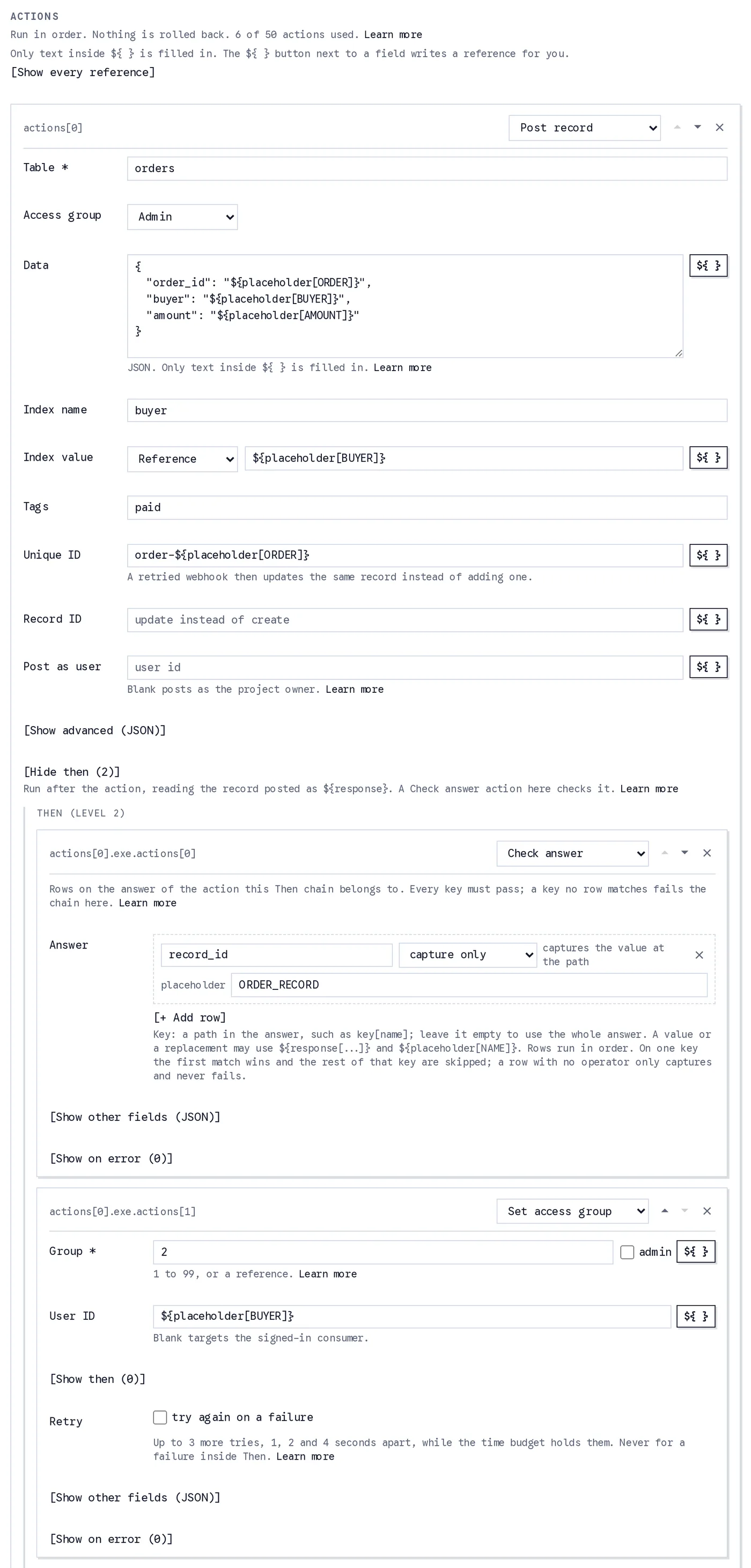
The first action of a payment webhook's chain. It posts the order; in its Then chain a Check answer reads the record posted and captures its id, and a Set access group lifts the buyer's access group.
- The select at the top of a card picks the action: Post record (
pstr), HTTP request (req), Set access group (acsg), Grant record access (acsr), Send e-mail (mail), Send newsletter (nlsd), Respond (resp) or Check answer (cond). The arrows reorder cards, the cross removes one, and + Add action appends one. The label on the card, such asactions[0], is the path the log and the error body use for it. - Each field is one key of
exe. The ${ } button next to a field writes a reference for you, and [Show every reference] at the top of the section lists every root and what it reads. - [Show advanced (JSON)] holds the keys a card groups together, such as a
pstr's reference, readonly, source and subscription. [Show other fields (JSON)] holds keys the card has no control for; they are merged into the action on save. - [Show then] on every card but a Respond's and a Check answer's holds the card's Then chain, which reads the answer as
${response[...]}. To check the answer, add a Check answer card inside it: one list of Answer rows, keys paths in the answer. - Retry on those six cards is
retry: true: the action is tried again on a failure. - [Show on error] opens the card's error chain, labelled On error with its level. It is a chain like any other, and its cards read the failure as
${error[...]}. - The line under the section title counts the actions used of the fifty a ticket may hold, and nesting stops at eight levels.
How a Chain Runs
Actions run in order. Each action but resp and cond produces an answer, read inside that action's own Then chain as ${response} and ${response[...]}, or captured into a placeholder by a Check answer placed there (Then on every action). When the chain ends, the consumer is answered the receipt, unless a Respond action answered earlier.
When an action raises, its err chain runs (with ${error[...]} set, and ${body} still the request the ticket received), and then the whole consumption stops and that error is answered. An err action that itself raises runs its own err chain and stops the error chain; the error originally reported is unchanged. Nothing is rolled back; an action with retry is tried again first.
On a failure the count is not consumed, the per-user counter is not incremented, and a log row with fail: true is written. Actions that ran before the failure stay applied. The one exception is a failure answered by a Respond in an error chain: the consumer got an answer, so the count is consumed and the per-user counter moves, and the failure is still in the log.
No rollback
There is no rollback. When the second action fails, the record the first one posted stays posted, and the sender may retry the whole request. Make every ticket safe to repeat:
- Give a
pstraction aunique_idbuilt from something unique in the request, such asorder-${body[payment][id]}. A retried webhook then updates the same record instead of creating a second one. - Turn on
return200for webhooks that retry on non-2xx answers, so a consumption that was refused on purpose (an event type you do not handle, say) is not retried for days.
Together these keep a retried webhook idempotent.
Limits and the time budget
- At most 50 actions in the whole tree of a ticket, error chains and nested chains included, nested at most 8 deep. The dashboard enforces both while you edit.
- The whole consumption must finish within 25 seconds of the request. Before each action and each HTTP call the engine checks what is left; when the budget is gone, the consumption fails with
TIMEOUTfor the action about to run, that action'serrchain is skipped, and the failure is logged. - Each HTTP call of a
reqaction has a 10 second timeout, answered asREQUEST_FAILEDwithreason: "timeout".
What is Templated
An action's parameters are templated right before it runs, by the rules in Templating: only text inside ${ } is a reference, such as ${body[payment][id]} or ${placeholder[BUYER]}, and everything else is used as written. Which keys are templated:
| action | templated keys |
|---|---|
req | url, headers, data, params |
acsg, acsr, pstr | every key of exe but condition and actions |
resp | status, body, resume |
cond | nothing: its parts are rows, compared as written |
A req action's method is one of the four methods and secretName is the literal name of a Secret Key; neither holds a reference. The actions of a Then chain are templated when each of them runs, where ${response} reads the answer, and the rows of a Check answer are literal wherever it sits. Two things apply to a req only: a value interpolated into its url is percent-encoded, and ${CLIENT_SECRET} resolves in its headers, data and params values when it names a Secret Key (see Sending a Secret Key).
Templating only touches string values, never object keys. "amount": "${body[payment][amount_total]}" becomes the number the request carried; "table": "orders" stays the text orders.
acsg: set the access group of a user
exe: { group: number (1..99) | "admin", user_id?: string, actions?: Action[] } // actions: the Then chain, reading the SUCCESS text as ${response}The target is user_id, or the consumer when user_id is absent (on a call that is not consumeTicket() with auth: true, that raises AUTH_REQUIRED). "admin" is access group 99.
The same guards apply as to grantAccess(): the target must be a user of this project, confirmed and not suspended, and the project owner cannot be a target. A refusal is ACTION_FAILED, with the operation's own code and message in detail.
Answers the text the grant returns, SUCCESS: Access has been granted to the user., which a Then chain reads as ${response}, and a Check answer in it with the empty key.
{ "act": "acsg", "exe": { "group": 2, "user_id": "${placeholder[BUYER]}" } }group may be a reference too, such as ${placeholder[GROUP]} filled by a lookup table.
acsr: grant private access to a record
exe: { record_id: string, user_id?: string | string[], actions?: Action[] } // actions: the Then chain, reading the SUCCESS text as ${response}The targets are user_id (one id or a list; on the dashboard, ids separated by commas), or the consumer. record_id must be a record id, not a unique id.
The grant is made on behalf of the record's uploader, so the rules of grantPrivateRecordAccess() apply: a grantee must be an approved user or an invitation, and the project owner cannot be a grantee. The uploader must be a user of the project or the project owner; a record uploaded anonymously fails with ACTION_FAILED and Record uploader is not a user.. When none of the targets could be granted, the action fails with No eligible user..
Answers the text the grant returns, such as SUCCESS: Granted 1 user to private access of record: <record id>.
{ "act": "acsr", "exe": { "record_id": "9x2K4mQ1pL8vB3nR6tW5yZ0cA7dF" } }pstr: post a record
Posts one record to the project's database, the way postRecord() does from the SDK: the same keys, limits and errors. Two keys are the ticket's own: user_id, which decides who posts the record (Who posts the record), and actions, the Then chain every action has (Then on every action). The full type is the pstr member of TicketAction.
{
  act: "pstr",
  exe: {
    table: {                                  // required; a plain name such as "orders" also works
      name: string;                           // required
      access_group?: "public" | "authorized" | "admin" | "private" | number; // 0 to 99
      subscription?: {
        is_subscription_record?: boolean;
        upload_to_feed?: boolean;
        notify_subscribers?: boolean;
        feed_referencing_records?: boolean;
        notify_referencing_records?: boolean;
      } | null;
    } | string;
    data?: any;                               // the record's data: any JSON
    index?: { name: string; value: string | number | boolean };
    tags?: string[];
    unique_id?: string;
    record_id?: string;                       // update this record instead of creating one
    reference?: string | null;                // a record ID or unique ID
    readonly?: boolean;
    source?: {
      referencing_limit?: number | null;
      prevent_multiple_referencing?: boolean;
      can_remove_referencing_records?: boolean;
      only_granted_can_reference?: boolean;
      allow_granted_to_grant_others?: boolean;
      referencing_index_restrictions?: {
        name: string;
        value?: string | number | boolean;
        range?: string | number | boolean;
        condition?: "=" | "!=" | ">" | ">=" | "<" | "<=";
      }[] | null;
    };
    user_id?: string;                         // a user ID: post as this user. Absent: the project owner
    actions?: TicketAction[];                 // the Then chain: reads the record as ${response}
  };
  err?: TicketAction[];                       // error chain
  retry?: boolean;                            // try again on a failure
}
The record is described the way postRecord() takes it:
- Where it goes.
tableis the table, as{ "name": "orders", "access_group": "admin" }or a plain name such as"orders", which is read as{ "name": "orders" }.access_groupis who can read the record:"public","authorized","admin","private"or a number from 0 to 99; left out, the record is public on a create and unchanged on an update, and"private"needsuser_id.table.subscriptionholds the subscription flags, needsuser_id, andnullclears them on an update. See Creating Records, Access Restrictions and Subscription options. - What it holds.
datais the record's data, any JSON.indexis one{ "name", "value" }pair to query the record by, the value text, a number or a boolean.tagsis a list of tags. See Indexing and Tags. - Which record.
unique_idis a name of your own for the record: posting the same unique ID again updates that record, so a retried webhook does not duplicate it.record_idupdates that record instead of creating one. See Unique ID and Updating Records. - Relations and flags.
referenceis the record ID or unique ID of a record this one refers to,sourcethe rules for the records that reference this one, andreadonly: truemakes the record read-only, which needsuser_id. See Referencing, Reference source settings and Readonly Record. - Who posts it.
user_id, a user ID or a reference that gives one; see Who posts the record. - Then.
actions, a chain run after the post, reading the record as${response}; a Check answer in it reads the record's fields, such asrecord_id.
On the dashboard the card has a field for each of these: Table, Access group (with Access group # under Authorized), Data, Index name and Index value, Tags, Unique ID, Record ID and Post as user; reference, readonly, source and subscription sit under Show advanced (JSON). See On the dashboard.
Every value may hold references, such as ${body[order][id]} or ${placeholder[BUYER]}, filled in right before the action runs (What is Templated). A value that is one whole reference keeps its type, so "value": "${placeholder[AMOUNT]}" can put a number in the index.
Any other key is refused when the ticket is registered, with Unknown key "<key>" in "actions[0].exe".. That includes the postRecord() options a ticket does not take: notification, remove_bin, reference_private_key and progress. A ticket cannot attach files to a record.
Example
A payment webhook saving the order as a record of the buyer, under a unique ID built from the payment's own id:
{
  "act": "pstr",
  "exe": {
    "table": {
      "name": "orders",
      "access_group": "admin"
    },
    "unique_id": "order-${body[payment][id]}",
    "index": {
      "name": "buyer",
      "value": "${placeholder[BUYER]}"
    },
    "data": {
      "payment": "${body[payment][id]}",
      "amount": "${body[payment][amount_total]}"
    },
    "user_id": "${placeholder[BUYER]}"
  }
}
TIP
A unique_id makes a retried webhook update the same record instead of duplicating it. Build it from the sender's own id for the event or the object, as above. See Unique ID.
Who posts the record
- Without
user_id, the project owner posts it. The project owner is not a user of the project, so a record it creates cannot be private, read-only or carry subscription settings (see What Project Owners Cannot Do); the post is refused and the action fails withACTION_FAILED. The exception is an update of another user's record (record_id), which the project owner may make read-only or whose subscription settings it may change. - With
user_id, that user posts it and the record is theirs. Write${user[user_id]}for the consumer of aconsumeTicket()call withauth: true(see User), or a placeholder a condition row captured, such as${placeholder[BUYER]}. Once its references are filled in, the value must be:- a user ID, which is a UUID such as
8f3a2c1e-4b5d-4e6f-9a7b-1c2d3e4f5a6b. Anything else, an empty value included, fails withACTION_FAILED, codeINVALID_PARAMETERandPost as user ("user_id") is not a valid user ID (UUID). - not the project owner's own ID, which fails with
Post as user cannot be the project owner. Leave it empty to post as the project owner. - a user of this project who is active, otherwise the action fails with
User does not exist.orUser is not active.
- a user ID, which is a UUID such as
Any other refusal of the post fails the action with ACTION_FAILED, with the operation's code and message in detail.
On the dashboard
- Access group is Public, Authorized, Private or Admin, as on the Database page; under Authorized an Access group # from 1 to 99 narrows the record to that group (blank is 1). It starts at Public and is always saved with the action. An action saved without one opens as Public.
- Show advanced (JSON) takes
reference,readonly,sourceandsubscriptiononly: the first three go into the post,subscriptioninto the table. Saving refuses any other key, a value of the wrong type and a misspelt flag. A key the card has its own field for, such astableordata, is refused with the field to use. - Saving refuses an action that creates a private or read-only record, or one with subscription settings, while Post as user is empty, and marks the field that asks for it. An action with a
record_idis checked when it runs instead, since the project owner may keep another user's record private or make it read-only.
What ${response} holds
The record, as postRecord() resolves with it: the RecordData type. Records posted by a ticket are written on the server, so they are never client-side encrypted, even into private.
For the example above, the Then chain reads this as ${response}, and a Check answer in it reads the same fields by key (the ids are made up):
{
  "record_id": "Xp7kQ2m9Lr4Aab3cdk12",
  "unique_id": "order-pi_3Ns8Qw2eZvKYlo2C",
  "user_id": "5b0f9c2e-7d31-4a8e-9f6b-2c4d1e8a7b30",
  "table": {
    "name": "orders",
    "access_group": "admin",
    "subscription": {
      "is_subscription_record": false,
      "upload_to_feed": false,
      "notify_subscribers": false,
      "feed_referencing_records": false,
      "notify_referencing_records": false
    }
  },
  "index": { "name": "buyer", "value": "5b0f9c2e-7d31-4a8e-9f6b-2c4d1e8a7b30" },
  "data": { "payment": "pi_3Ns8Qw2eZvKYlo2C", "amount": 14890 },
  "uploaded": 1791532099306,
  "updated": 1791532099306,
  "readonly": false,
  "referenced_count": 0,
  "source": {
    "referencing_limit": null,
    "prevent_multiple_referencing": false,
    "can_remove_referencing_records": false,
    "only_granted_can_reference": false
  },
  "ip": "203.0.113.10",
  "bin": {}
}
${response[record_id]} is the record's id, ${response[data][amount]} the amount it holds and ${response[table][name]} its table; a Check answer row with the key record_id captures the id into a placeholder. tags and reference appear when the record has them.
req: HTTP request with its own condition and chain
Sends one HTTP request from the server and can run more actions on its answer. The full type is the req member of TicketAction.
{
  act: "req",
  exe: {
    url: string;                                     // required: http:// or https:// and a hostname; references in it are percent-encoded
    method?: "GET" | "POST" | "PUT" | "DELETE";      // default "GET"; written out, never a reference
    secretName?: string;                             // a Secret Key of the project, written out; its value is ${CLIENT_SECRET} in headers, data and params
    headers?: { [name: string]: string };            // request headers, values templated; Host and X-Skapi-Ticket cannot be set
    data?: any;                                      // the request body, POST and PUT only: JSON with a content-type: application/json header, form encoded otherwise
    params?: { [key: string]: any };                 // the query string, on every method; a value that is not text is sent as compact JSON
    actions?: TicketAction[];                        // the Then chain, run on an answer below 300: ${response} is the response
  };
  err?: TicketAction[];                              // error chain
  retry?: boolean;                                   // try again on a failure
}url, headers, data and params are templated right before the call (What is Templated); method and secretName are used as written, and each nested action is templated when it runs. On the dashboard the card has URL, Method, Secret key, Headers and Query (JSON objects) and Data, the request body, shown for POST and PUT. Any other key is refused when the ticket is registered, with Unknown key "<key>" in "actions[0].exe"..
Every request also carries X-Skapi-Ticket: <service_id>/<ticket_id>, so your server can tell which ticket is calling.
A request sends text: a JSON or form-encoded body, never multipart and never a file's bytes, so where the API takes a URL send one (a hosted file's, or a temporary URL of a record file). Its headers go as written: there is no request signing (OAuth 1.0a), and no action can change a Secret Key, so a token that expires is not refreshed by a ticket. Store a long-lived token, or get a session token with one req and use ${response[body][token]} in its Then chain. No action reads a record: what a run needs comes in the request, from a request's answer, or as literal text.
A req may call a ticket URL of this project, that is a URL with /tp/<service_id>/, /tg/<service_id>/ or /tpa/<service_id>/, only after a Respond on its chain path: a Respond earlier in the same chain, one inside an earlier action's Then chain (that chain always runs with its action), or one in an ancestor chain before the branch. A Respond in an error chain, or in a later action, does not count. Anywhere else, registration refuses the ticket with "actions[...].exe.url" calls a ticket of this project before any Respond action: the call would run inside the request it is answering, and a ticket that calls itself this way loops with no queue. Put a Respond action before it, so the call runs as a queued run. Without the Respond the call is made while the original request is still being answered, so a ticket that calls itself recurses with no queue, no delay and no log row between calls; after a Respond the rest of the chain is a queued run, which is counted, delayed or scheduled, and logged. The dashboard shows the same warning under the URL field and refuses the save. See URL and address rules.
Headers
headers are sent as written, their values templated. Two headers are the engine's own, and a ticket cannot set either: registration refuses them whatever their case or surrounding spaces.
Hostis always the host of theurl:"actions[0].exe.headers.host": the "Host" header cannot be set: it is always the host of the URL.X-Skapi-Ticketis added to every call:"actions[0].exe.headers.X-Skapi-Ticket": the "X-Skapi-Ticket" header cannot be set: Skapi adds it to every request a ticket sends.A copy in a ticket saved before this rule is dropped from the call.
A header name must be ASCII, with no :, line break or NUL. A header value cannot hold a line break, NUL or a character outside Latin-1. What you write is checked when you register, so a header that could never be sent is refused before it is saved:
- a name:
"actions[0].exe.headers.X-Näme": the "X-Näme" header cannot be sent: a header name is ASCII, without ":", line breaks or NUL. - the text of a value outside its
${...}references (a$${...}counts as the${...}it writes):"actions[0].exe.headers.X-Name": the "X-Name" header cannot be sent: a header value cannot hold line breaks, NUL or characters outside Latin-1 (send such values in the body).The message never quotes the value.
What a reference fills in is known only when the call is made, and a value read from the request easily breaks the rule (a customer name in Korean, say). Such a call fails with REQUEST_FAILED and detail: { "reason": "invalid_header", "header": "<name>" } before anything is sent, with the same rule in its message: The "X-Name" header of the request to "api.example.com" cannot be sent: a header value cannot hold line breaks, NUL or characters outside Latin-1 (send such values in the body). Send such values in the body.
Failures and the answer
A status of 300 or above, a refused address, a connection error or a timeout raises REQUEST_FAILED, with detail: { status, body } or detail: { reason }. body is the parsed answer, or, when its text is longer than 4 KB, the first 4 KB of that text (compact JSON for a JSON answer). Redirects are never followed: a 3xx is a failure. The Then chain runs only on an answer below 300.
Answers the whole response: status, headers (names in lowercase) and the parsed body. The Then chain reads it as ${response}:
{
  "status": 200,
  "headers": { "content-type": "application/json", "x-request-id": "7f3a2c1e" },
  "body": { "status": "ok", "shipment": { "id": "shp_9x4c" }, "carrier": "dhl" }
}
${response[body][carrier]} reads dhl, ${response[status]} the status and ${response[headers][content-type]} a header. A body that is not JSON is its text under body. A ticket saved before 2026-10-09 keeps answering the body alone until it is saved again; see A request's answer was its body.
{
  "act": "req",
  "exe": {
    "url": "https://api.example.com/fulfil",
    "method": "POST",
    "headers": {
      "content-type": "application/json"
    },
    "data": {
      "user_id": "${placeholder[BUYER]}",
      "payment": "${body[payment][id]}"
    },
    "actions": [
      {
        "act": "cond",
        "exe": {
          "response": [
            {
              "key": "status",
              "operator": "=",
              "value": "ok"
            }
          ]
        }
      },
      {
        "act": "pstr",
        "exe": {
          "table": {
            "name": "shipments",
            "access_group": "admin"
          },
          "data": {
            "id": "${response[body][shipment][id]}",
            "carrier": "${response[body][carrier]}",
            "payment": "${body[payment][id]}"
          }
        }
      }
    ]
  }
}
The Check answer's row reads the response: its key body[status] is the body's status. The pstr after it runs only when the row passes; inside it, ${response[body][shipment][id]} and ${response[body][carrier]} read the body, while ${body[payment][id]} still reads the request the ticket received.
Checking the response
The response is checked by a Check answer placed in the req's Then chain. Its rows read the whole response, whatever its shape:
- a key is a path in the response:
statusthe HTTP status,headers[content-type]a header (names in lowercase),body[status]orbody[shipment][id]a field of the parsed body, and""the whole response as text. Rows follow the key rule of the ticket's ownbodyrows: every key listed must pass, rows on the same key are alternatives, and a missing field is a mismatch. nullandundefined, captures,setValueWhenMatchand lookup tables work the same way. A replacement lands in the response, so the actions after the Check answer read it as${response[...]}, and captures land in the shared placeholder pool.
The rest of the chain runs after it, reading the answer as ${response}. It may hold any action, another req with a Secret Key of its own included, whose own Then chain reads its answer as ${response}. A failure anywhere inside, in the HTTP call or in the Then chain, is the failure of this req action: its err chain runs, and ${error[path]} names the innermost action that failed. It is answered with stage: "action" and, in action, the innermost action that failed (this req for its HTTP call, the Check answer for a response that does not pass, the nested action for anything else), never as a bare condition failure, and is always logged.
Sending a Secret Key
A req can send one of your project's Secret Keys, such as the API key of the service it calls, without the key ever being written into the ticket. Name the key in secretName (on the dashboard, the Secret key select of an HTTP request action), and write ${CLIENT_SECRET} where its value goes:
{
  "act": "req",
  "exe": {
    "url": "https://api.example.com/v1/orders/${body[order][id]}",
    "method": "GET",
    "secretName": "orders_api_key",
    "headers": {
      "Authorization": "Bearer ${CLIENT_SECRET}"
    }
  }
}secretNameis the literal name of a Secret Key, never templated. It must exist when you register; otherwise registration is refused with"actions[0].exe.secretName": no secret key named "orders_api_key" in Secret Keys.${CLIENT_SECRET}is replaced by that key's value, in the values of this samereq'sheaders,dataandparams, and nowhere else. Write it with braces: the bare$CLIENT_SECRETofforwardRequest()is plain text in a ticket.- Where it is refused. Registration refuses
${CLIENT_SECRET}in theurl, in a header name or any other key, in areqwithoutsecretName, in every other action, and in condition rows. Each refusal says where it was found and why. - A written-out host. With
secretNameset, the URL's scheme and host must be written out, with no reference before the path, so a request can never choose where the key goes:https://api.example.com/v1/orders/${body[order][id]}is accepted,https://${placeholder[HOST]}/v1/ordersis refused. - Nothing in the request can reach it. The key is read on the server when the action runs. A request that sends a field called
CLIENT_SECRET, or the text${CLIENT_SECRET}in a value that ends up in the call, sends exactly that text: templating runs once and never expands a value it has just filled in. - Never shown back. Before the response is checked, handed to the nested actions, written to the log, or put into a
REQUEST_FAILEDerror, the key's value is replaced by the text${CLIENT_SECRET}wherever it is found: in the body, in the response headers, and in the text of a connection error. A copy is found as sent, and escaped up to three times over. Each time it is escaped, any of these notations may be used, mixed character by character: percent-encoding (hex in either case, and%uXXXX), backslash escapes (\uXXXX,\u{...},\xXX,\/and the other short escapes), and HTML character references (/,/,/). So a key percent-encoded twice inside a redirect link, or written with%2Ffor its/, is still found. There are two limits. A copy escaped four times over is not found. And a copy is not guaranteed to be found when one round of escaping escapes only part of an escape the round before it wrote, and the part it leaves as written still reads as an escape on its own: that part is then decoded one round too early, as another character. For a character outside ASCII, the escape is the whole run of%XXbytes that writes it. For example,%D0%BAis the%D0%BAofкwith only its firstDescaped, so%BAis read alone;2;is the of a space with only2;escaped, sois read alone, since a reference without its;is accepted. Percent-encoding, backslash escaping and HTML escaping, each applied to the whole text, never split an escape this way. A space and a+count as the same character. When the text right before a copy runs into it as the start of an escape (5%before a copy that begins withab), the replacement starts where that escape starts. All of this happens before a long errorbodyis cut to 4 KB, and a cut that would end partway into a copy of the key, or partway into an escape, drops that part. The call itself is never logged. - Long answers. An answer of any size is searched whole and passed on whole: nothing is cut, so a JSON body of any size still parses, and a Check answer,
${response}and the log read all of it. A body longer than 131,072 characters is searched that many characters at a time, and a copy that runs from one stretch into the next is found as if the body were read at once. While it searches, the call checks the 25 second budget about every 131,072 characters. When the budget runs out while the answer is being searched, the action fails withREQUEST_FAILED,detail: { "reason": "timeout" }and the messageThe request to "<host>" timed out., and nothing of the answer is passed on. Only the answer to areqthat names asecretNameis searched, so no other call can fail this way. - Missing key. When the key no longer exists in Secret Keys, the action fails with
REQUEST_FAILEDanddetail: { "reason": "secret_missing", "secretName": "orders_api_key" }, and nothing is sent. - Locked does not apply. A ticket reads the key on the server, on your behalf, so the key's Locked setting, which is about which users may call
forwardRequest(), plays no part.
Each call is held to the Destinations of the key it carries, the per-key allowlist described under Restricting Where a Key Can Be Sent. A key with no destinations may be sent anywhere a ticket can call. A call that carries no key is not restricted by any key. A refused call fails with REQUEST_FAILED and detail: { "reason": "refused_address" } before the address is resolved or dialled. The list is read with the key itself, from a lookup held for at most 60 seconds, so narrowing a key's Destinations takes effect within a minute.
TIP
Give every key a ticket sends Destinations that cover only the API it is for, such as https://api.example.com/v1/orders. Then no edit to the ticket, and nothing a request carries, can send it anywhere else.
URL and address rules
Registration validates the shape of the URL; consumption vets the address on every call.
- The URL must start with
http://orhttps://written out, followed by a hostname: no IP literal, no userinfo (user@oruser:password@before the host). A URL that is one whole reference, such as${placeholder[URL]}, is refused. - A value interpolated into the URL with
${...}is percent-encoded as one piece,/,?,#,&and=included, so a value from the request cannot add path segments or query parameters. A value that is.or..is refused withREQUEST_FAILEDandreason: "refused_address". - The URL is sent the way a browser sends it. A tab or line break anywhere in it is removed, not encoded:
/a<tab>bgoes out as/ab. So are spaces and control characters up to U+001F before the scheme. A hostname outside ASCII is IDNA-encoded:https://bücher.example/callsxn--bcher-kva.example. In the path and query, a space, any other control character and every character outside ASCII is percent-encoded as UTF-8:/a b/égoes out as/a%20b/%C3%A9. Text that is already percent-encoded is sent as written. Every rule below reads the encoded hostname, so a name that only looks different, such as one written in fullwidth letters, is judged as the host it reaches. - A Secret Key's Destinations are compared with the URL as sent, so list what is sent: a hostname outside ASCII in its encoded form (
https://xn--bcher-kva.example), and a path outside ASCII percent-encoded with uppercase hex, as the engine writes it (https://api.example.com/caf%C3%A9, not/café, which can never match). A path your URL already writes percent-encoded is compared as you wrote it. - Registration refuses a hostname that cannot be encoded, such as
bü..x, or that holds a character standing for/,?,#,@or:once normalized, such as the fullwidth/ofex/ample.com, with"actions[0].exe.url": URL has an invalid hostname.It refuses a hostname that is an IP address once encoded, such as127.0.0.1in fullwidth digits or8.8.8.8.with a trailing dot, and any[or]in the host, with"actions[0].exe.url": URL must use a hostname, not an IP address.A call made from a stored URL is refused the same way, withREQUEST_FAILEDandreason: "refused_address". - The engine resolves the host and refuses loopback, link-local (
169.254/16,fe80::/10), private (10/8,172.16/12,192.168/16,fc00::/7), unspecified and IPv4-mapped forms of those. - A ticket may call a ticket URL (
*.skapi.dev): another ticket of any project, or itself, which is how a chain repeats (see Repeating Every 30 Minutes). A call to a ticket URL of this project (a URL with/tp/<service_id>/,/tg/<service_id>/or/tpa/<service_id>/) must come after a Respond on its chain path: a Respond earlier in the same chain, inside an earlier action's Then chain, or in an ancestor chain before the branch; one in an error chain or in a later action does not count. Otherwise registration refuses it with"actions[...].exe.url" calls a ticket of this project before any Respond action: the call would run inside the request it is answering, and a ticket that calls itself this way loops with no queue. Put a Respond action before it, so the call runs as a queued run.Without the Respond the call is made while the original request is still being answered, so a self-calling ticket recurses with no queue, no delay and no log row between calls; after a Respond the rest runs as a queued run, counted, delayed or scheduled, and logged. The dashboard shows the same warning under the URL field and refuses the save. The raw API gateway hosts (*.execute-api.*.amazonaws.com) stay refused. A call to a ticket of another project has no such rule: a loop with no wait in it ends when the call's 10-second timeout fails it withREQUEST_FAILED, and a loop that waits (a Respond withresume) is bounded by the plan's queued ticket runs. - The connection is pinned to the vetted address. Redirects are never followed; a 3xx is
REQUEST_FAILEDwith its status. - A call that carries a Secret Key must be on that key's Destinations, when it has any. See Sending a Secret Key.
- Every request carries
X-Skapi-Ticket: <service_id>/<ticket_id>.
A refused address is REQUEST_FAILED with reason: "refused_address".
mail: send an e-mail
exe: {
  template: string;                                  // the template ID of a custom e-mail template, written out
  to: string;                                        // one e-mail address, templated: "${user[email]}", "${body[email]}"
  placeholders?: { [name: string]: string | number | boolean }; // values for the template's own ${name} placeholders, templated
  actions?: TicketAction[];                          // the Then chain, reading the SUCCESS text as ${response}
}
Sends one e-mail from the project's email alias: the custom template template names, with its subject, to the address to resolves to. Custom templates are the Custom tab of the Automated Emails page: a template sent to that tab's address like any other, identified by its template ID rather than set in use. See Custom e-mails.
templateis the template ID, written out, never a reference, and the template must be on the Custom tab when the ticket is registered; otherwise registration is refused with"actions[0].exe.template": no custom e-mail template with this ID. Send the template to the Custom address on the Automated Emails page first; its ID is in the reply and on the Custom tab.A template deleted after registration fails the action withACTION_FAILEDwhen it runs.tois templated and must be one e-mail address once filled in; anything else fails the action withACTION_FAILED.placeholdersfills the template's own placeholders: a key is a placeholder's name as written in the template without${ }, and its value is templated.${service_name}and${email}, the recipient, are filled in by default, and a key of the same name overrides them. Up to 30, names of letters, digits and_, values text, numbers or booleans. A value is inserted as text, never as markup.- Counts as one e-mail send of the project's month, like a newsletter to one subscriber: the plan's monthly sends, the Trial owner cap and the complaint shutoff apply, and a refusal fails the action with
QUOTA_EXCEEDED(detail: { "field": "emlsd" }), itserrchain running. See Sending limits. - Once the e-mail is queued the action is done: should counting the send fail afterwards, the action still answers SUCCESS, its log row carries a
warning, and Skapi is told. A retry never sends an e-mail twice.
Answers the text SUCCESS: E-mail sent to <address>., which a Then chain reads as ${response}.
{
  "act": "mail",
  "exe": {
    "template": "4f1c9e2b7a8d3c6e5b0f1a2d3e4c5b6a",
    "to": "${user[email]}",
    "placeholders": { "name": "${user[name]}", "order": "${body[order][id]}" }
  }
}![The Actions section of a ticket: a Send e-mail card with a Template ID field, a To field reading ${user[email]} and placeholder rows; under it a Send newsletter card with a Group select and a Newsletter ID field](/screenshots/tickets-mail-actions.webp)
A Send e-mail card names a template of the Custom tab by its ID and the recipient with a reference; a Send newsletter card picks a group and names one of its stored newsletters by ID.
On the dashboard the Send e-mail card has Template ID, copied from the Template ID column of the Custom tab, To, and Placeholders as name and value rows.
nlsd: send a newsletter
exe: {
  group: "public" | "authorized" | number | string;  // the list: public, authorized, 2 to 99, or a named group; written out
  newsletter: string;                                // the newsletter ID of a newsletter stored under that group; written out
  actions?: TicketAction[];                          // the Then chain, reading the SUCCESS text as ${response}
}
Sends a stored newsletter of the group to every subscriber of the group, the way a newsletter e-mailed to the group's address goes out: one copy each, from the project's email alias, with the unsubscribe link at the bottom. The newsletter may be one that went out before, or one saved with the group's Save without sending address; see Saving a newsletter without sending it.
groupandnewsletterare written out, never references. The newsletter must be stored under that group when the ticket is registered; otherwise registration is refused with"actions[0].exe.newsletter": no newsletter with this ID is stored under this group. Its ID is on the Newsletters page.A newsletter deleted after registration fails the action withACTION_FAILEDwhen it runs.- Counts one e-mail send per subscriber, under the same limits as an e-mailed newsletter; past them the action fails with
QUOTA_EXCEEDED(detail: { "field": "emlsd" }) before anything is sent. The 15 minute wait between e-mailed newsletters does not apply. - The newsletter's row is marked sent: its Not sent mark goes, and
getNewsletters()returns the time insent. Once the newsletter is queued the action is done: should marking the row fail afterwards, the action still answers SUCCESS, its log row carries awarningand the row keeps its mark until the next send, and Skapi is told. A retry never sends a newsletter twice.
Answers the text SUCCESS: Newsletter sent to the subscribers of <group>., where the group is public, authorized, group <n> or the group's name.
{ "act": "nlsd", "exe": { "group": "promo", "newsletter": "msg-1" } }On the dashboard the Send newsletter card has a Group select and a Newsletter ID field. Copy the ID from the Newsletter ID column of the Newsletters page, under the group's tab; a group may hold hundreds of newsletters, so there is no list to pick from.
resp: answer the caller
exe: {
  status?: number | string;   // 100 to 599, default 200; or a reference
  body?: any;                 // any JSON, templated; absent: the receipt { tkid, hash }
  resume?: "stop" | "0m" | string | number  // what happens after the answer; default "stop"
}
A Respond answers the consumer now, with status and body, instead of the receipt the consumption would answer at its end. consumeTicket() resolves with that body as sent, and a webhook sender reads it with the status you chose. An error status such as 404 is an answer like any other: the consumption is not a failure, the count is consumed, and the log shows answered 404. A body cannot carry a stage key, since that is how a consumer tells an error from an answer; registration refuses it, and so does the action when a reference puts one there.
One Respond per run. A consumption is answered once, so registration refuses a second Respond on a path a first one already answered on: "actions[2]": a Respond already answered on every path to this one; a consumption is answered once. A second Respond may only sit in an error chain of an action that runs before the first. That one place is allowed because when such an action fails, the first Respond never runs. A Respond that finds the consumer already answered when it runs fails with ALREADY_RESPONDED.
In an error chain. A Respond in an err chain answers the consumer, say a 200 with a message of your own, while the failure it handles is still logged with its code: the Log tab shows answered 200 (on error: ACTION_FAILED), the consumer got an answer, so the count is consumed and the per-user counter moves. With resume, only error chains go on afterwards; the chain the failed action sat in is over.
After the answer: resume
| value | what happens |
|---|---|
absent, or "stop" | the rest of the chain does not run |
"0m" | the rest of the chain goes on at once, in the background |
"10m", "2h", "3d" | it goes on after that delay, rounded to the nearest whole minute: the run starts a few seconds after that :00, so a chain that repeats keeps its grid (see Going on later) |
| a number | a time in milliseconds since the epoch: it goes on at that time, to the second. A literal time in the past is refused at registration; a time a reference fills in that is already past goes on at once |
Anything else is refused: "actions[0].exe.resume" should be "stop", "0m", a delay such as "10m", "2h" or "3d", or a time in milliseconds since the epoch. Every run that goes on is a queued run, counted against the plan's monthly figure; see Going on later.
{
  "act": "resp",
  "exe": {
    "status": 202,
    "body": { "ok": true, "order": "${body[order][id]}" },
    "resume": "0m"
  }
}
On the dashboard the Respond card has Status, Body (JSON) and After answering: Stop, Go on at once in the background, Go on after a delay, Go on at a time (local time, to the minute), or As a reference says.
cond: Check answer
exe: {
  response: Row[];   // rows on the answer of the action whose Then chain this is; key "" is the whole answer as text
}
A Check answer is a plain answer checker. It sits in the Then chain of an action, and its rows read that action's answer, whatever its shape. A key is a path in the answer: record_id or table[name] in a posted record; status, headers[content-type] or body[shipment][id] in a request's response; and "" the whole answer as text, which is how the SUCCESS text of a grant or a send is checked: { "key": "", "operator": ">=", "value": "SUCCESS" }. The rows work as the ticket's own body rows do (Conditions and Placeholders): the same operators, the key rule, null and undefined, captures into the shared placeholder pool, setValueWhenMatch and lookup tables. The request, the caller and the pool are checked by the ticket's own condition, not by a Check answer action.
Every key listed must pass: rows on the same key are alternatives, the first that matches wins and the rest of that key are skipped unread, so nothing is re-checked against a replaced value; a row that only captures never fails.
The key is a literal path. value and setValueWhenMatch may hold ${response}, ${response[key]} and ${placeholder[NAME]}, resolved right before the comparison, so a row can compare a field of the answer with a value captured earlier (body[order_id] equals ${placeholder[ORDER]}) or with another field of the answer, and a replacement can be built from both; a value that is one whole reference keeps its type. Any other reference is refused when the ticket is registered: "actions[0].exe.actions[0].exe.response[0].value": only ${response}, ${response[key]} and ${placeholder[NAME]} may be used in a Check answer row's value and setValueWhenMatch. A row's placeholder captures the replaced value when the row has one, else the field as found. A key no row matches fails the chain here, with CONDITION_FAILED, stage: "action", this action's path and detail: { "field": "response", "keys": [...] }; the err chain of the action the Then chain belongs to runs like any other failure, and the consumption stops with that error unless a Respond in the err chain answers. A Check answer answers nothing and produces nothing, so it has no Then chain of its own. Registration refuses a Check answer outside a Then chain ("actions[0].exe": a Check answer only runs inside the Then chain ("actions") of an action, where its rows read that action's answer.), one with any key but response, and one with no row.
{ "act": "cond", "exe": { "response": [{ "key": "body[status]", "operator": "=", "value": "paid" }, { "key": "body[id]", "placeholder": "ORDER" }] } }On the dashboard the Check answer card is one list of Answer rows, and the card is offered inside Then chains only.
What each action answers
What a Then chain reads as ${response}, and what a Check answer in it checks, is the SDK's own answer for the operation: what postRecord(), grantAccess() and grantPrivateRecordAccess() resolve with, and the whole response of a request.
| action | ${response} is | a key reads |
|---|---|---|
pstr | the record, a RecordData | record_id, table[name], data[amount] |
req | the response: { status, headers, body } | status, headers[content-type], body[shipment][id] |
acsg | the text SUCCESS: Access has been granted to the user. | the empty key: the whole text |
acsr | the text SUCCESS: Granted <n> user to private access of record: <record id> | the empty key |
mail | the text SUCCESS: E-mail sent to <address>. | the empty key |
nlsd | the text SUCCESS: Newsletter sent to the subscribers of <group>. | the empty key |
resp, cond | nothing: ${response} inside their chains is still the enclosing action's answer |
A posted record (pstr): the fields postRecord() returns, with data as the record holds it; see the example under What ${response} holds.
{ "record_id": "Xp7kQ2m9Lr4Aab3cdk12", "unique_id": "order-pi_3Ns8Qw2eZvKYlo2C", "user_id": "5b0f9c2e-7d31-4a8e-9f6b-2c4d1e8a7b30", "table": { "name": "orders", "access_group": "admin", "subscription": { "...": "..." } }, "index": { "name": "buyer", "value": "5b0f9c2e-7d31-4a8e-9f6b-2c4d1e8a7b30" }, "data": { "payment": "pi_3Ns8Qw2eZvKYlo2C", "amount": 14890 }, "uploaded": 1791532099306, "updated": 1791532099306, "readonly": false, "referenced_count": 0, "source": { "...": "..." }, "ip": "203.0.113.10", "bin": {} }A response (req): the status, the headers with their names in lowercase, and the body, parsed when it is JSON, its text otherwise.
{ "status": 200, "headers": { "content-type": "application/json" }, "body": { "status": "ok", "shipment": { "id": "shp_9x4c" } } }A grant or a send (acsg, acsr, mail, nlsd): one line of text, so ${response} is that text and a Check answer row reads it with the empty key, as in { "key": "", "operator": ">=", "value": "SUCCESS" }.
SUCCESS: Access has been granted to the user.
SUCCESS: Granted 1 user to private access of record: Xp7kQ2m9Lr4Aab3cdk12
SUCCESS: E-mail sent to ana@example.com.
SUCCESS: Newsletter sent to the subscribers of promo.
Then on every action
Every action that answers something takes one more key in exe: actions, its Then chain, run after the action. Inside it ${response} and ${response[key]} read the answer, ${body} is still the request the ticket received, and the pool holds everything captured so far. A failure anywhere inside is the failure of the action the chain belongs to, with the inner action's path in action.path; it is never retried.
To check the answer, put a Check answer in the chain. Its rows read the answer under the rules of the ticket's own body rows, their keys paths in the answer, and a key of "" the whole answer as text, which is how the SUCCESS text of a grant or a send is checked: { "key": "", "operator": ">=", "value": "SUCCESS" }. Whatever shape the answer has, a record, a response or a line of text, the same rows read it. A row that captures lands in the shared placeholder pool, so a value needed further down the ticket is captured here, and a setValueWhenMatch lands in the answer, so the actions after it read the replacement as ${response[...]}. A row that does not pass fails the chain there, with CONDITION_FAILED at the Check answer's path, and the err chain of the action the chain belongs to runs.
{
  "act": "pstr",
  "exe": {
    "table": { "name": "orders", "access_group": "admin" },
    "unique_id": "order-${body[payment][id]}",
    "data": { "amount": "${body[payment][amount_total]}" },
    "actions": [
      {
        "act": "cond",
        "exe": {
          "response": [{ "key": "record_id", "placeholder": "ORDER_RECORD" }]
        }
      },
      {
        "act": "req",
        "exe": {
          "url": "https://api.example.com/notify",
          "method": "POST",
          "headers": { "content-type": "application/json" },
          "data": { "record": "${response[record_id]}", "table": "${response[table][name]}" }
        }
      }
    ]
  }
}
The Check answer captures the id of the record the pstr posted, and the req reads the record as ${response}; ${placeholder[ORDER_RECORD]} reads the same id anywhere later in the ticket, in another chain included. On the dashboard every card but a Respond's and a Check answer's has [Show then], and a Check answer card is one list of Answer rows.
Retrying an action
retry: true on an acsg, acsr, pstr, req, mail or nlsd action tries it again when it fails: up to three more times, with pauses of 1, 2 and 4 seconds, as long as the time budget still holds the pause plus a second. What is retried is the action itself; a failure inside its Then chain, and a TIMEOUT, are never retried, and neither is a refusal that waiting cannot change: an address that is not an e-mail address, a template or a newsletter that no longer exists, or the month's e-mail sends used up (QUOTA_EXCEEDED). Those fail at once. The last failure is the one reported and the one the err chain runs for, once. The log row of the action carries attempts and retried, the earlier failures, so a call that succeeded on its second try reads ok after 2 tries in the dashboard.
A Respond or a Check answer cannot be retried; registration refuses retry: true on either with "actions[0].retry": a Respond cannot be retried. On the dashboard the six cards have a Retry checkbox.
Going on later: queued runs
A Respond with resume other than "stop" ends the consumption for the caller and leaves the rest of the chain to a queued run: the actions still to run, the placeholder pool, the request and the consumer are stored, and the run starts at once ("0m"), after the delay, or at the time. It runs with a fresh 25 second budget, by the ticket as it is stored when it starts, and writes a log row of its own: the Log tab shows the original consumption as answered 202 with a queued mark, and the run as resumed, naming the consumption it continues and how long it waited. The run's own action rows sit under it. A run cannot answer the consumer again, since the consumer is gone: registration keeps a second Respond off that path.
What a queued run costs and what can stop it:
- Every run that goes on counts toward the plan's queued ticket runs for the UTC month. When the month's figure is reached the dashboard shows a banner on the project's pages, and the same two numbers are on the
Settingspage under Plan & Usage. The figures: Trial 100, Standard 10,000, Premium 100,000 and $1.00 per 1,000 past that. On Trial and Standard a Respond that would queue a run past the month's figure fails withQUOTA_EXCEEDED(Queued ticket runs for this month are used up. Consider upgrading your plan.,detail: { field: "tkq", limit, used, month }) before it answers; itserrchain runs, and a Respond that stops is never affected. The Plan & Usage card shows the month's figure, and the Tickets page says so when it is used up. See Plans and Limits. - A delay is rounded to the nearest whole minute (
:00seconds) and the run starts a few seconds after it:"10m"queued at 10:00:04 goes on at 10:10:00, queued at 10:00:40 at 10:11:00. That is what keeps a repeating ticket on its grid: a round that starts at 10:00:00 and takes a few seconds queues 10:30:00, not 10:30:03, so the rounds stay on the same minutes however long the loop runs (as long as a round's own work takes under 30 seconds). A fixed time starts on the second. - Deleting the ticket drops its runs that are still waiting, when they come due; so does deleting the project. A run that cannot be started after three tries is written to the log as a failed row with
skipped, and so is a run that comes due while its ticket is switched off, withskipped: disabled(see Disabling a ticket). - A
reqto a ticket URL of this project (/tp/,/tg/or/tpa/<service_id>/) is accepted only after a Respond on its chain path, so such a call is always made from a queued run: counted, delayed or scheduled, and logged. Registration refuses it anywhere earlier; see URL and address rules. - On a ticket with a Concurrency setting, a run that waits holds the consumption's slot for the whole wait: a ticket with Concurrency
1whose chain answers with"resume": "1d"is full for that day, and a call made to it meanwhile waits in its line or is refused withTICKET_BUSY, as its When full says. See One at a time: concurrency.
Error Chains With ${error}
An err chain is a normal chain that runs only when its action fails. Inside it, ${error} and its keys describe the failure:
| reference | value |
|---|---|
${error[code]} | the error code, such as ACTION_FAILED |
${error[message]} | its one-sentence message |
${error[detail]} | the code-specific detail object |
${error[action]} | the act that failed |
${error[path]} | its chain path, such as actions[2].actions[0] |
${body} is still the request the ticket received, and the placeholder pool holds everything captured so far.
{
  "act": "pstr",
  "exe": {
    "table": {
      "name": "orders",
      "access_group": "admin"
    },
    "data": {
      "payment": "${body[payment][id]}"
    }
  },
  "err": [
    {
      "act": "req",
      "exe": {
        "url": "https://hooks.example.com/alert",
        "method": "POST",
        "headers": {
          "content-type": "application/json"
        },
        "data": {
          "text": "order record failed: ${error[message]}",
          "payment": "${body[payment][id]}"
        }
      }
    }
  ]
}
After the alert is sent, the consumption stops and answers the pstr failure, not the alert's outcome. An error chain is for telling someone, or for writing a record of the failure; it cannot make the consumption succeed. It can answer the caller, though: a Respond in an error chain sends a status and body of your own while the failure stays in the log.