
Admin Permissions
This page is the complete policy for what an admin account and the project owner can do in your project, and what neither of them can do. Admin Features is the short summary of the same rules. This page is the detail, including the exact message every refusal returns.
Every rule about who may do what is enforced on the server, so it holds whatever sends the request: the SDK, a request you build yourself, or the Skapi dashboard. A few refusals also happen in the SDK before the request leaves, and those are marked as such.
Roles
Every account of your project has an access group, a number from 0 to 99 kept in its profile. An account starts in access group 1 unless it was created or invited with another one. Access groups 90 and up are admins.
| Role | Who it is | How it is given |
|---|---|---|
| User | Access groups 0 ~ 89. An ordinary account of your project. | Signing up, or being created or invited into the project. |
| Admin | Access groups 90 ~ 98. Can use the admin methods, with the limits on this page. | grantAccess(), or an account created or invited with that access group, or the Users page of the Skapi dashboard. |
Admin, access group 99 | Every admin right, with none of the access group limits. | The same three ways. |
| Project owner | The Skapi account that created the project. It is not a user of the project, and it has no access group. | Owning the project. |
| Skapi staff | Support accounts, used only when you ask Skapi for help. | Skapi. |
Throughout the documentation, "admins" means access groups 90 ~ 99, and the project owner is named separately where the rule differs for it.
Two things follow from the project owner not being a user of your project:
- Its own records can never be private, read only, or carry subscription settings. See What the project owner cannot do.
- It never appears in
getUsers(), and no user can grant it private record access.
Who is an admin, and who is a full admin
Two different lines run through this page:
- Admin (access groups
90~99, and the project owner): may call the admin methods at all. - Access group
99and the project owner: also exempt from the access group rules, and allowed to update another user's record data and read only records.
Wherever a rule says "admins in access groups 90 ~ 98", access group 99 admins and the project owner are not limited by it.
Rules that apply to every action on another account
The access group ceiling
An admin can never hand out an access group higher than their own. An admin in access group 95 can grant up to 95, create an account at up to 95 and invite at up to 95. The project owner has no ceiling.
grantAccess() refuses with Cannot grant an access group higher than your own., and createAccount() and inviteUser() refuse with Cannot give a user an access group higher than your own., both with the INVALID_REQUEST code.
The rank rule
An admin in access groups 90 ~ 98 may not act on an account whose access group is the same as or higher than their own. Two admins in access group 95 cannot touch each other's accounts, and neither of them can touch an access group 99 account.
The rule covers every method that acts on another account:
grantAccess()updateUserAttributes(), andupdateProfile()with another user'suser_idblockAccount()andunblockAccount()deleteAccount()
The refusal is the same everywhere, and nothing in the request is changed:
{
    code: "INVALID_REQUEST";
    message: "No access to modify admin.";
}
Admins in access group 99 and the project owner are not limited by this rule. They reach every account of the project, except their own through updateUserAttributes(), see Your own account.
Disabled accounts
A disabled account counts at the access group it had before it was disabled, so an access group 90 admin cannot delete a disabled access group 99 admin.
An account that was disabled before this rule shipped is the exception: disabling it overwrote its stored access group with 1, whatever its group really was. Such an account ranks as access group 1 for these rules, and it comes back from recovery as an ordinary access group 1 user, until its access group is set again.
Access group 99 accounts and grantAccess
Moving an access group 99 account to another access group is reserved for access group 99 admins and the project owner. Any other admin is refused by grantAccess() with:
{
    code: "INVALID_REQUEST";
    message: "No access to expel admin.";
}
This is the older, narrower rule, and it is what an access group 99 target answers on grantAccess(). Every other target at or above the caller's own access group answers No access to modify admin. instead.
Your own account
- Your profile. Nobody, the project owner and access group
99admins included, may edit their own account withupdateUserAttributes(). UseupdateProfile()with nouser_id, the same call any user makes.updateProfile()given your ownuser_idstill ignores it and updates your own profile, exactly as before. - Your access group.
grantAccess()refuses your ownuser_idwithUser cannot self grant access. - Blocking.
blockAccount()andunblockAccount()refuse your ownuser_idwithUser cannot block self.andUser cannot unblock self. - Deleting.
deleteAccount()with your ownuser_iddeletes your own account. It is not ranked, because it is your own account, and it is irreversible. A user who is not an admin leaves the project withdisableAccount()instead.
Accounts of other projects
An admin reaches only the accounts of their own project. A user_id that belongs to another project is refused with No access., User does not exists. or User not found, depending on the method, and nothing about that account is returned.
Managing user accounts
Creating accounts
createAccount() creates a confirmed account with the password you choose. The account can log in at once.
access_groupdefaults to1and is capped by the ceiling.- The e-mail address is not verified by this method. An account you create with a
usernametherefore logs in with that username alone until the user verifies the address. An account created without one logs in with the address it was created with, which is its permanent login ID. See Login IDs. - Accounts count against your plan's user limit. Over it, the request is refused with
User limit exceeded.
Inviting users
inviteUser() sends an invitation e-mail carrying the login ID, a random password and an acceptance link that is valid for 7 days. Accepting it verifies the e-mail address, so an invited account has its e-mail login from the moment it accepts.
access_groupdefaults to1and is capped by the ceiling.- While an invitation to an address is still pending, a second invitation to that address is refused with
User is already invited. resendInvitation()sends the same temporary password again, and its${username}placeholder renders the login username for an invitation created with ausername, and the e-mail address otherwise.cancelInvitation()deletes the pending account. An invitation that was already accepted is refused withUser already exists.
Granting an access group
grantAccess() sets another account's access group, from 0 to 99. 'admin' is accepted as a name for 99.
Besides the ceiling, the rank rule and the access group 99 rule, the target must be usable:
- A blocked account is refused with
Cannot grant access to suspended user.Unblock it first. - An account that has not confirmed its signup is refused with
User signup is not confirmed.
In the dashboard, this is the Grant Access dialog on the Users page: it takes one group from 1 to 99 for every selected account, and an account's own form takes 0 to 99. The same refusals apply.
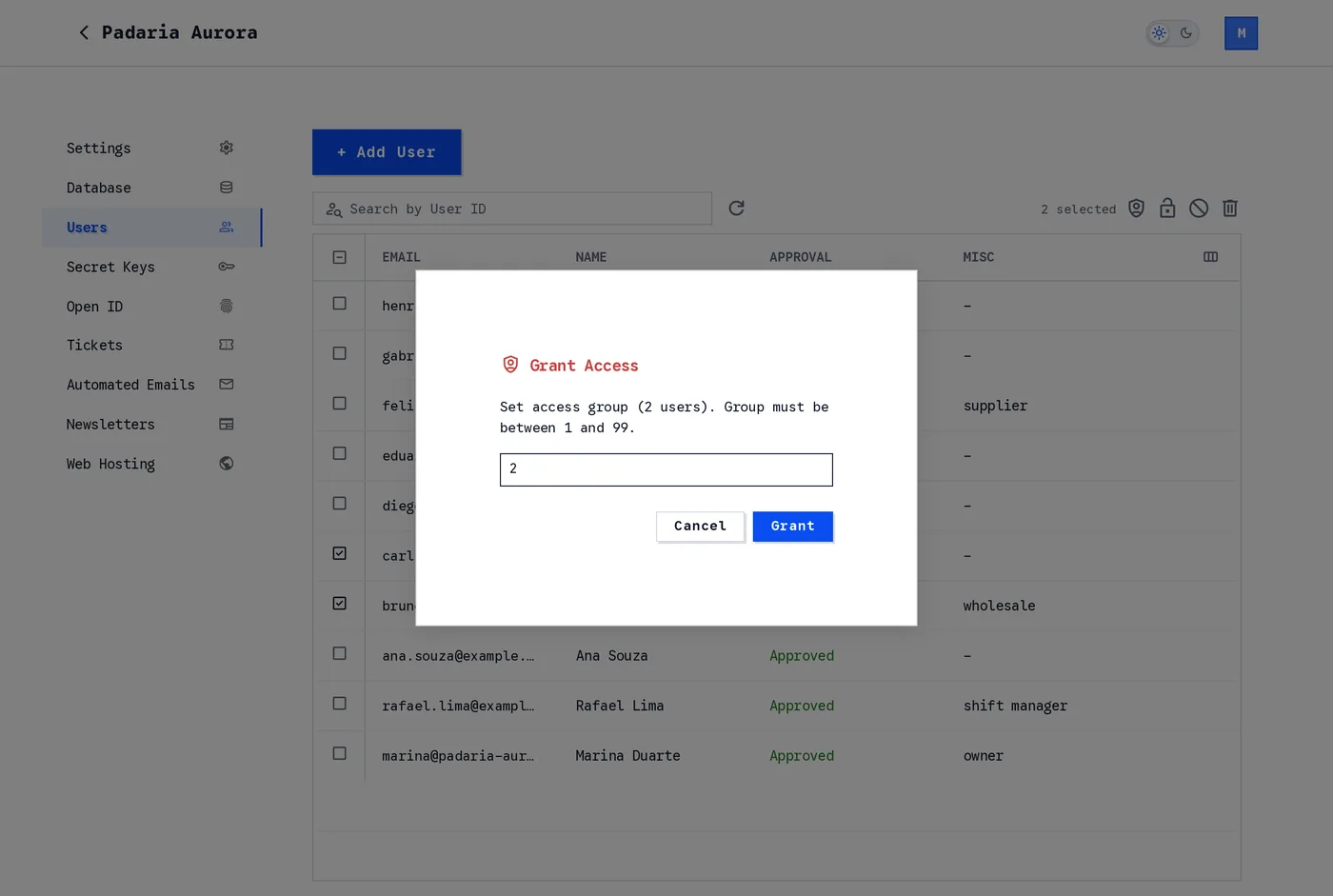
Grant Access on the Users page.
TIP
An access group is a number your own code reads as well. Records, tables and named newsletter groups are gated by it, so moving an account to 90 or above gives it the admin methods and read and write access to every access group in the database, with one exception for a single record fetched by its record_id. See Reading and uploading and Access Restrictions.
Editing a user's profile
updateUserAttributes(), and updateProfile() with another user's user_id, change another account's profile. Attributes you leave out are not touched.
Only profile attributes can be changed: email, name, nickname, birthdate, gender, phone_number, address, picture, profile, website, family_name, given_name, middle_name, locale and misc. The five *_public visibility flags are not among them: they are set when the account is created and are the user's own afterwards (see Public visibility). Any other attribute name is refused before anything is read or written, with INVALID_PARAMETER and "<attribute>" cannot be changed.
That list is deliberate. An access group, a block, a signup confirmation and an e-mail verification are not profile attributes, and none of them can be set through this method:
- Change an access group with
grantAccess(). - Block and unblock with
blockAccount()andunblockAccount(). - Only the account itself can verify its own e-mail address, with
verifyEmail().
Changing a user's e-mail takes their e-mail login away
An e-mail address you set here is written unverified, whoever sends the request, the project owner and access group 99 admins included, and the account's e-mail login is removed in the same request.
The account keeps logging in with its username, or with the address it was created with if it was created without one. Any other e-mail login comes back only after the user runs verifyEmail() on the new address, and then a few seconds later, on the account's next token rather than in the verifyEmail() response.
The address is private until the user makes it public themselves; an admin cannot set email_public. See Login IDs.
A login username is permanent. A request that tries to set the login handle without an email is refused with INVALID_REQUEST and The login username is permanent and cannot be changed.
Public visibility
Each of email, phone_number, address, gender and birthdate is private unless its *_public flag is on. An admin sets the flags once, when creating the account, with createAccount() or inviteUser() (they default to false). After that the flags belong to the user: only the account itself changes them, with updateProfile(). An admin's updateUserAttributes() that carries one, in any access group, is refused with INVALID_PARAMETER and "email_public" cannot be changed by an admin. Public visibility is set when the account is created, and afterwards only by the user., and nothing in the request is written. The dashboard's user form shows the visibility checkboxes when creating an account and not when editing one.
Login IDs
An account logs in with one or two login IDs:
- The login ID it was created with: its
usernameif it was created with one, otherwise the e-mail address it signed up with. It is permanent. No method changes it, and it keeps working after the account changes its e-mail. - Its e-mail login: the account's current e-mail address, granted only once that address is verified.
An address is verified by clicking the signup confirmation link, by accepting an invitation, or by verifyEmail(). The e-mail login arrives a few seconds after that, on the account's next token. Before it, that address answers INCORRECT_USERNAME_OR_PASSWORD.
This is what an admin needs to know about it:
- An account created with
createAccount()with ausername, or signed up with ausernamein a project with no signup confirmation, logs in only with its username until it verifies its e-mail address. - An account you invite gets its e-mail login when it accepts the invitation.
- An e-mail you change with
updateUserAttributes()removes the account's e-mail login until the user verifies the new address.
When a login ID is already taken, createAccount() and inviteUser() are refused with EXISTS and E-mail "user@email.com" is already a login ID in this service., or Username "jane@email.com" is already a login ID in this service. for a username that is an e-mail address logging another account in. A refusal means one thing: the address is already a login ID the other account was granted, its own login ID or its own verified e-mail.
An account can lose its e-mail login without anyone touching it
An e-mail login an account holds without having verified the address blocks nothing. It is removed, and the address is given to the account that proves it.
So an account of your project can lose its e-mail login when another account signs up with that address, is created or invited with it, has an admin change its e-mail to it, logs in with OpenID under it, or simply verifies it. The account that loses it keeps logging in with the login ID it was created with.
Blocking and unblocking
blockAccount() stops an account from logging in. unblockAccount() lets it in again. Both follow the rank rule.
Blocking does not delete anything, and it does not change the account's access group. A blocked account cannot be given a new access group until it is unblocked.
Deleting accounts
deleteAccount() deletes another account and everything it owns. It follows the rank rule.
DANGER
This is irreversible. The account's records, files and subscriptions go with it. There is no recovery, and no undo.
A user disabling their own account is a different thing: the account is disabled, and its data is kept for 90 days so that the user can recover it. See Disable and Recover Account.
What an admin can see about a user
getUsers() returns more to an admin than to a user:
- The
emailof every account, including addresses the user has not made public, plusemail_verified. - The
miscfield of every account. For everyone else,miscis visible only to the account itself. searchFor: 'email'searches those addresses, so an admin can find an account by an address that is not public.
Everything else follows the normal rules: an attribute a user has not made public is not returned to other users, and user_id searched with a value array (looking up several known ids at once) requires the = condition.
Records
Record rights are set by the access group of the record and by who uploaded it. The full rules are in Access Restrictions; this section is the admin side of them.
Reading and uploading
Admins (access groups 90 ~ 99) and the project owner:
- Query records in every access group, including access group
99, the group namedadmin. - Read subscription records and their files without subscribing to anyone.
- Upload records to any access group, including one higher than their own. Anyone else is refused with
User has no access to this group. - See the private and admin record counters in table information, which other users do not get.
Private records are the exception, and they are covered on their own below.
Fetching one record by its record_id is stricter
Reading a table group by group is a query, and every admin queries every access group. Fetching a single record, by its record_id or by a unique_id, is checked against that one record instead, and there only admins in access group 99 and the project owner are exempt from the access group rules.
An admin in access groups 90 ~ 98 who fetches a record in a higher access group than their own is refused with:
{
    code: "INVALID_REQUEST";
    message: "No access to the record.";
}
The same record still comes back in a query of that access group. So an admin in access group 95 reaches every record up to access group 95 by record_id, and records in access groups 96 ~ 99 only through a query, unless the record's uploader has granted them access to that record.
Updating another user's record
| Who | What it may change on another user's record |
|---|---|
Admins in access groups 90 ~ 98 | The subscription settings only. |
Admins in access group 99, and the project owner | The data and every setting, read only records included. |
| Everyone else | Nothing. |
An admin in access groups 90 ~ 98 who changes anything else is refused, and the first differing field is named:
{
    code: "INVALID_REQUEST";
    message: "Admins can only change the subscription settings of another user's record (data differs).";
}
The comparison is made against the stored record, not against the keys your request carries, so a form that sends the whole configuration back unchanged is fine.
A read only record can be updated only by the project owner and admins in access group 99. Everyone else, its own uploader included, is refused with Record is read only.
A record you change this way stays its user's record, and its subscribers stay its user's subscribers.
Subscription settings
The project owner and every admin can change the subscription settings of another user's record, with three exceptions:
- A private record is its user's alone.
- A record of the project owner can never have subscription settings, whoever asks:
Records of the project owner cannot have subscription settings. - A record posted by an anonymous visitor belongs to no user of the project, so its settings can only be kept as they are or turned off:
Anonymous records cannot have subscription settings.
See Who can change subscription settings.
Private records
private is the only access group whose contents may be end to end encrypted, so the line around it is absolute:
- Only the record's own user can move a record into or out of
private. - Nobody else changes anything on a private record, subscription settings included, and nobody else attaches or deletes its files.
- Admins and the project owner read another user's private record data only where they have access to it, the same way as any other user: the record was shared with them with
grantPrivateRecordAccess(), or they have private access to the record it references, because they uploaded that record or it was shared with them. Being able to read the referenced record is not enough, so a public record opens none of the private records attached to it. Private access is never granted to the project owner, so the owner reads another user's private record only when it references a record the owner uploaded. - Without that access, the project owner and admins in access group
99still see the record, and itsdatacomes back as{ __is_private__: null }, however they reach it: byrecord_id, in a listing of a table or of the whole project, in a listing that namesaccess_group: 'private', or in atagquery. Everything else on the record stays visible, and their own private records are never withheld from them. Admins in access groups90~98without access cannot fetch the record at all: they are refused withUser has no private access.
What admins can do on a private record:
- Delete it.
deleteRecords()reaches any record in the project. - Remove private access from a user with
removePrivateRecordAccess(), on any record of the project, not only their own.
Granting private access stays with the record's user, and with the users that user allowed to grant others. Private access can never be granted to the project owner: Private access cannot be granted to service owners.
Files
Files are an admin right of their own, separate from a record's data and settings. The project owner and every admin (access groups 90 ~ 99) can attach files to another user's record and delete its files, as long as the record is not private.
- Attach by passing the files to
postRecord()with the record'srecord_id. For admins in access groups90~98the call must change nothing else, and a read only record refuses them withRecord is read only. - Delete with
deleteFiles(), read only or not, up to 1000 URLs in one call.
A file attached this way is stored under the record's user, so that user can delete it, it moves with the record and it is deleted with the record. Files on a private record are locked to its user, for everyone: Only the owner of a private record can delete its files.
See Files on Records of Other Users.
Uploads are signed for the size they declare
Every upload, from an admin or a user, is signed for exactly the byte count the request declares, and storage refuses a file of any other size. The SDK declares the exact size of what it uploads, encrypted files and empty files included, so nothing changes for SDK uploads.
Deleting records
deleteRecords() lets an admin, and the project owner, delete any record of the project, including private and read only records. Every user deletes only their own.
A frozen database
When the database is frozen in your project settings, users cannot write to it. Admins (access groups 90 ~ 99) and the project owner still can: they upload, update and delete records and files as usual, so a frozen project stays manageable.
Everyone else is refused with Database is frozen. Write access is denied for this user., and on a delete with Database is frozen. Delete access is denied for this user.
Newsletters, subscribers and notifications
| Action | Who |
|---|---|
| Read the whole subscriber list of a group | The project owner and admins (access groups 90 ~ 99). In access groups 90 ~ 98 the addresses come back masked, with an opaque subscriber_token beside each one, and the paging cursor comes back sealed |
| Search the subscriber list of a group by e-mail address | The project owner, Skapi staff and admins in access group 99. Admins in access groups 90 ~ 98 are refused with No access. |
| Subscribe or unsubscribe any e-mail address to a group | The project owner and admins in access group 99 |
| Register, list and delete named newsletter groups | The project owner and admins in access group 99 |
| Send push notifications to all users, or to chosen users | The project owner and admins (access groups 90 ~ 99) |
Notify one's own subscribers of a new record or reference (notify_subscribers, notify_referencing_records) | Any signed-in user, for their own records. Only subscribers who set get_notified and can read the record are notified. See Subscription notifications |
| Send a newsletter, and set an e-mail template | The project owner only, from the project's email address. Admins in any access group, 99 included, cannot. The SDK has no method for either: the owner sends the email to the address the Skapi dashboard shows. |
| Read a sent newsletter's delivery statistics | The project owner and admins in access group 99 |
getNewsletters() returns a sent newsletter's read, bounce and complaint counts only to the project owner and admins in access group 99. Everyone else who may read that group gets the message id, the timestamp and the subject.
getNewsletterSubscription({ group }) returns the whole list to an admin. Anyone else gets their own subscriptions. email narrows the list to the addresses that start with what you type, and it belongs to the project owner, Skapi staff and admins in access group 99: everyone else is refused with No access.
Admins in access groups 90 ~ 98 read masked addresses
The subscriber list of a group returns the subscribed_email of every row masked, as j**@**.com, to an admin in access groups 90 ~ 98. The project owner, admins in access group 99 and Skapi staff read the addresses in full, and every user reading their own subscriptions reads their own address in full.
A masked address is not a usable address. You cannot send mail to it, and it is not unique: john@example.com and jane@example.com both come back as j**@**.com. Using it as a key silently loses rows, and counting distinct values with it undercounts.
Each masked row of a group listing carries a subscriber_token. It is opaque, it is the same string for the same subscriber on every call and every page, and it is a different string for a different address, so it is what a list, a selection or a distinct count is keyed on. It is a key for working with a listing, not an id to store: the platform can reissue tokens, and the same subscriber then reads as a new one. It is not a readable address and cannot be turned into one client side, and it is scoped to this project, this project owner and this newsletter group, so the same subscriber reads as a different token in another group and a token from another group or project matches nothing here. A caller who reads addresses in full is sent no token at all, and the single user path read with user_id carries none either.
The paging cursor is sealed for them. The startKey a page hands back is the database's own key, and it names the last row of that page as it is stored, address in full. For an admin in access groups 90 ~ 98 the server seals it instead, so the page hands back { seal: '...' } and nothing readable leaves. Ordering, page size, endOfList and fetchMore are unchanged. A startKey passed in has to be the previous page's object unchanged: a rebuilt, edited or borrowed cursor, a sealed cursor sent by a caller who reads full addresses, or a plain one sent by a caller who does not, is refused with INVALID_PARAMETER and "startKey" does not belong to this request.
The e-mail search is closed to them. It matches the stored address, never the mask, so leaving it open to the caller the mask exists for would hand a masked address back one letter at a time. An admin in access groups 90 ~ 98 is refused with INVALID_REQUEST and No access., the same refusal an account that is not an admin gets.
Reading another user's subscriptions with their user_id has always masked the address for admins in access groups 90 ~ 98, and still does. An admin reading their own subscriptions unmasked passes their own user_id, because a group with no user_id is the group listing for any admin.
Masking is a guard rail, not a wall. It keeps subscriber addresses off everyday admin screens, and it is what makes the addresses of subscribers who never created an account in your project hard to read for an admin below access group 99.
It does not make an admin account safe to hand out, and one limit is worth stating plainly: the mask only ever protects subscribers who are not accounts of your project. An admin in access groups 90 ~ 98 reads the e-mail address of every account with getUsers(), public or not, as What an admin can see about a user describes. So for any subscriber who also signed up, the address is one ordinary call away. getUsers() is deliberately not restricted, because an admin who manages accounts needs to see them. What masking, the token and the sealed cursor harden is the list of addresses that exist only as newsletter subscriptions.
Every other user may only subscribe and unsubscribe their own address. pushNotification() refuses an account that is not an admin with User has no access to send notifications.
Project settings belong to the project owner
Project settings are not an admin right, at any access group. They are changed by the project owner's Skapi account on the Skapi project pages, and by Skapi staff when you ask Skapi for help. An admin of your project, access group 99 included, is refused:
{
    code: "INVALID_REQUEST";
    message: "Only the project owner can change project settings.";
}
The SDK has no method for any of them, so this is the answer a request built by hand gets when it carries an admin's token.
Owner only, everything that configures the project itself:
- The project name and description, and the CORS list.
- Freeze Database, Allow Signup, Anonymous Login, Allow Inquiries, Allow Anonymous Posts to Database, Require Login, and the AI agent option.
- The keys on the Secret Keys page. Listing those keys answers with their stored values, so reading them is owner only as well.
- Website hosting: the subdomain, the files of the hosted site, its 404 page and its CDN refresh. See Hosting your website.
- The OpenID loggers, registering, updating, deleting and listing them, since a logger's stored URL, headers and parameters come back with the listing.
- The sender e-mail address the project's mail is sent from, and the automated e-mail templates, which decide what the project's verification, welcome, invitation and confirmation mail says.
- Creating, disabling, enabling and deleting the project, and its plan and billing.
Unchanged, and still normal admin work: users, invitations, records and their files, newsletters and named newsletter groups, notifications, and reading analytics. Tickets were already the project owner's alone, with their own message: Only the project owner can register tickets.
Website hosting is the project owner's
The files of the hosted site are uploaded and deleted on the project's Web Hosting page by the project owner, as are its 404 page and its CDN refresh, and the subdomain they are served on is registered, moved and dropped on the project's Settings page. No admin does any of it, access group 99 included. See Hosting your website.
What admins cannot do
- Read or change any account's password. There is no method that resets another account's password, for any role. A user recovers their own password with
forgotPassword(), which needs a verified e-mail address. - Mark an e-mail address verified. An address an admin sets is written unverified, and only the account itself can verify it.
- Change their own profile through
updateUserAttributes(), or their own access group, or block or unblock themselves. - Give an access group higher than their own, or, in access groups
90~98, act at all on an account at or above their own access group. - Change a login
username. It is permanent. - Read another user's private records, or attach and delete their files, or change anything on them.
- Change the data or settings of another user's record, apart from its subscription settings, unless they are in access group
99. - Update a read only record, unless they are in access group
99. - Move a record into or out of
private. Only the record's own user can. - Grant private record access on another user's record. Only its user, and the users that user allowed to grant others, can.
- Upload or delete the files of the hosted site, or refresh its CDN cache, unless they are in access group
99. An admin in access groups90~98is refused withNo access. - Change project settings, such as freezing the database, allowing signup, the CORS list, the subdomain, the OpenID loggers, the Secret Keys or the automated e-mail templates. This holds for admins in access group
99as well, and there is no SDK method for any of them: project settings are managed by the project owner on the Skapi project pages. A request that carries an admin's token is refused withOnly the project owner can change project settings.See Project settings belong to the project owner.
What neither admins nor the project owner can do
- Read or change an account's password.
- Read another user's private record data. A private record fetched by the project owner or an access group
99admin comes back without its data, and admins in access groups90~98cannot fetch it by itsrecord_idat all: they getUser has no private access. - Read encrypted record data of another user without being granted access to it, and private access can never be granted to the project owner, so the project owner can never read it. Only the record's uploader can re-encrypt a record, so removing a user's access does not take back a copy that user already decrypted.
- Change a login
username. - Move another user's record into or out of
private.
What the project owner cannot do
The project owner's Skapi account is not a user of your project, so its own records are limited:
- It cannot upload records to the
privateaccess group:The project owner cannot upload records to the private access group. - It cannot upload read only records, or make an existing record of its own read only:
The project owner cannot upload read-only records. - Its own records can never have subscription settings, whoever sends the request, admins included.
A record that already is private or read only, and belongs to a user, still follows the usual rules: the project owner can update it, change its subscription settings unless it is private, and delete it.
TIP
Apart from these, the project owner can do everything an access group 99 admin can do.
Errors
Every message below is the exact text the server returns, and every code is the code field of the error.
Managing accounts
| Code | Message | Returned by |
|---|---|---|
INVALID_REQUEST | No access. | Any admin method called by an account that is not an admin, and any method aimed at an account of another project |
INVALID_REQUEST | Invalid access. | The SDK, before the request leaves, when the signed in account is below access group 90 |
INVALID_REQUEST | User needs to login. | The SDK, before the request leaves, when nobody is signed in |
INVALID_REQUEST | No access to modify admin. | grantAccess(), updateUserAttributes(), updateProfile() with another user_id, blockAccount(), unblockAccount(), deleteAccount() |
INVALID_REQUEST | No access to expel admin. | grantAccess() on an access group 99 account |
INVALID_REQUEST | Cannot grant an access group higher than your own. | grantAccess() |
INVALID_REQUEST | Cannot give a user an access group higher than your own. | createAccount(), inviteUser() |
INVALID_PARAMETER | "access_group" should be within range: 0 ~ 99. | grantAccess() |
INVALID_REQUEST | User cannot self grant access. | grantAccess() |
INVALID_REQUEST | Cannot grant access to suspended user. | grantAccess() on a blocked account |
INVALID_REQUEST | User signup is not confirmed. | grantAccess() on an account that has not confirmed its signup |
INVALID_REQUEST | Cannot modify attributes of the current user. | updateUserAttributes() with your own user_id, from the SDK and from the server |
INVALID_PARAMETER | At least one attribute to update is required. | The SDK, updateUserAttributes() with only a user_id |
INVALID_PARAMETER | No user_id provided. | updateUserAttributes(), updateProfile() with another user_id |
INVALID_PARAMETER | No attributes provided. | updateUserAttributes(), updateProfile() with another user_id, when the request carries no attributes at all |
INVALID_PARAMETER | "<attribute>" cannot be changed. | updateUserAttributes(), for an attribute outside the editable list |
INVALID_REQUEST | The login username is permanent and cannot be changed. | updateUserAttributes() sending a login handle without an email |
EXISTS | E-mail "user@email.com" is already a login ID in this service. | createAccount(), inviteUser(), updateUserAttributes() |
EXISTS | Username "jane@email.com" is already a login ID in this service. | createAccount(), inviteUser() |
EXISTS | User already exists. | createAccount(), inviteUser(), resendInvitation(), cancelInvitation() on an account that already exists |
EXISTS | User is already invited. | inviteUser() while an invitation to that address is pending |
NOT_EXISTS | No invitation found for: user@email.com. | resendInvitation(), cancelInvitation() |
INVALID_REQUEST | User limit exceeded. | createAccount(), inviteUser() |
INVALID_REQUEST | Monthly email send limit reached. Consider upgrading your plan. | inviteUser(), resendInvitation(): an invitation e-mail counts as one of the project's monthly e-mail sends. See Inviting Users |
INVALID_REQUEST | E-mail sending is turned off for this project because of spam complaints. | inviteUser(), resendInvitation(), while the project's newsletter sending is turned off for complaints |
INVALID_REQUEST | User cannot block self. | blockAccount() with your own user_id |
INVALID_REQUEST | User cannot unblock self. | unblockAccount() with your own user_id |
INVALID_REQUEST | Admin access only. | deleteAccount() on another account, from an account that is not an admin |
NOT_EXISTS | User does not exists. | grantAccess(), blockAccount(), unblockAccount(), deleteAccount() |
NOT_EXISTS | User not found | updateUserAttributes(), updateProfile() with another user_id |
Records and files
| Code | Message | Returned by |
|---|---|---|
INVALID_REQUEST | User has no access to this group. | postRecord() uploading above your own access group |
INVALID_REQUEST | No access to the record. | getRecords() fetching one record by record_id that is in a higher access group than the caller's own, admins in access groups 90 ~ 98 included |
INVALID_REQUEST | User has no private access. | getRecords() fetching one private record by record_id, from an account without private access to it, admins in access groups 90 ~ 98 included |
INVALID_REQUEST | User has no access to update this record. | postRecord() on another user's record, from an account that is not an admin |
INVALID_REQUEST | Record is read only. | postRecord() on a read only record, from anyone but the project owner and access group 99 admins |
INVALID_REQUEST | Admins can only change the subscription settings of another user's record (<field> differs). | postRecord() from admins in access groups 90 ~ 98 |
INVALID_REQUEST | Only the owner of a record can move it into or out of the private access group. | postRecord() from the project owner or an admin on another user's private record |
INVALID_REQUEST | User has no access to change the private access of the record. | postRecord() moving another user's record out of private |
INVALID_REQUEST | Records of the project owner cannot have subscription settings. | postRecord() |
INVALID_REQUEST | Anonymous records cannot have subscription settings. | postRecord() |
INVALID_REQUEST | The project owner cannot upload records to the private access group. | postRecord() from the project owner |
INVALID_REQUEST | The project owner cannot upload read-only records. | postRecord() from the project owner |
INVALID_REQUEST | The record should be owned by the user. | deleteFiles() from an account that is not an admin |
INVALID_REQUEST | Only the owner of a private record can delete its files. | deleteFiles() on a private record |
INVALID_REQUEST | Record should be owned by the user. | removePrivateRecordAccess() from an account that is not an admin |
INVALID_REQUEST | Private access cannot be granted to service owners. | grantPrivateRecordAccess() naming the project owner |
INVALID_REQUEST | Database is frozen. Write access is denied for this user. | postRecord(), uploadFiles(), deleteFiles() while the database is frozen |
INVALID_REQUEST | Database is frozen. Delete access is denied for this user. | deleteRecords() while the database is frozen |
INVALID_PARAMETER | "size" is required and must be the exact byte size of the file, an integer of 0 or more. | A hosting or file store upload request that does not declare its exact size |
INVALID_REQUEST | No access. | Uploading or deleting a file of the hosted site, and refreshing its CDN cache, from anyone but the project owner, access group 99 admins and Skapi staff |
Newsletters and notifications
| Code | Message | Returned by |
|---|---|---|
INVALID_REQUEST | No access. | getNewsletterSubscription() searching by email, from anyone but the project owner, Skapi staff and admins in access group 99, admins in access groups 90 ~ 98 included. Also reading another user's subscriptions from an account that is not an admin |
INVALID_PARAMETER | "startKey" does not belong to this request. | getNewsletterSubscription({ group }), for a paging cursor that was rebuilt, edited, minted for another project, owner or group, or sent by the other side of the masking line |
INVALID_PARAMETER | "group" is required to search by "email". | getNewsletterSubscription() |
INVALID_PARAMETER | "email" cannot be used with "user_id". | getNewsletterSubscription() |
INVALID_PARAMETER | "email" should be 1 ~ 255 characters. | getNewsletterSubscription(), before the access check above |
INVALID_REQUEST | User has no access to send notifications | pushNotification() from an account that is not an admin |
INVALID_PARAMETER | "user_ids" can name up to 1000 users. | pushNotification() with more than 1000 user IDs |
Project settings
| Code | Message | Returned by |
|---|---|---|
INVALID_REQUEST | Only the project owner can change project settings. | Every project settings request from an account that is not the project owner's Skapi account, admins in access group 99 included |
INVALID_REQUEST | Only the project owner can register tickets. | Registering, updating or deleting a ticket as an admin |